New Aspect Setting
Add a new aspect setting when you want to give a group of aspects its own orb and color. Click New beneath the aspect settings list, then name the setting and fill in its orb, angles and color in the editor.
Add an Aspect Setting
New sits beneath the list on the Aspects tab of the Aspect Settings Window. On the Mundane, Natal and Transit windows, click the Aspects tab first if the Parallels tab is showing; the Primary Directions, Solar Arc Directions and Secondary Progressions windows have no tab strip and show the list directly.
To add a setting:
- Click New beneath the list.
A setting named New Aspect Setting is added at the end of the list, numbered when a setting of that name already exists. It starts with a neutral gray color and no angles, and it is selected in the list and shown in the editor, ready to fill in. It previews in the open charts of the window's chart type at once and is kept when you save; see Save Aspect Settings.
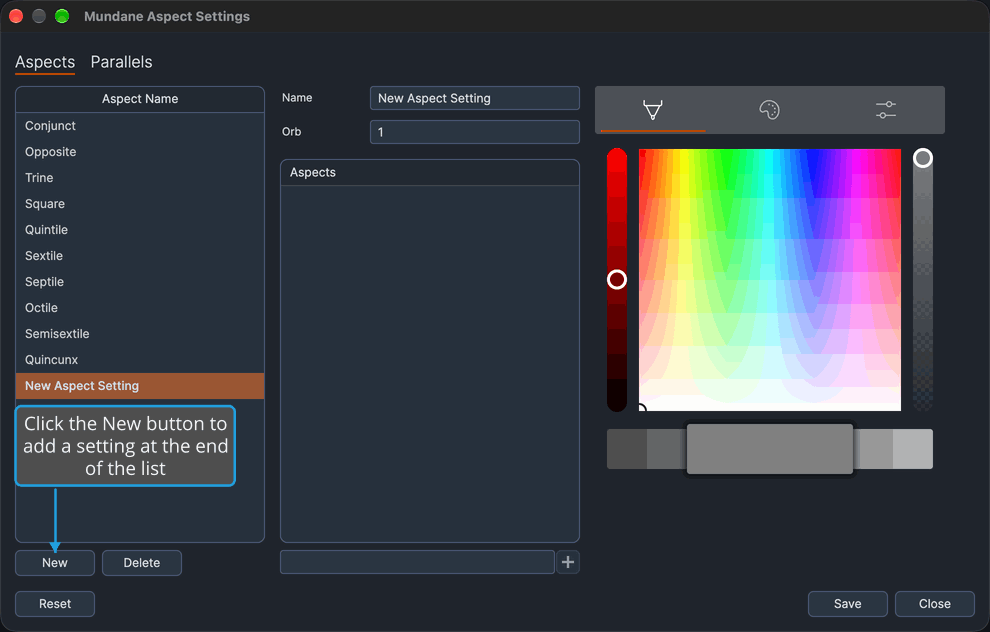
Next, give the setting its name, orb, angles and color in the Aspect Settings Editor.
The order of the list sets which setting takes precedence, and a new setting starts at the end. To move it up the list, see Reorder Aspect Settings.