Ephemeris Table
The ephemeris table displays the records a study generates, one row for each step across the study's date range. After you generate a study, its records appear in the table on the right.
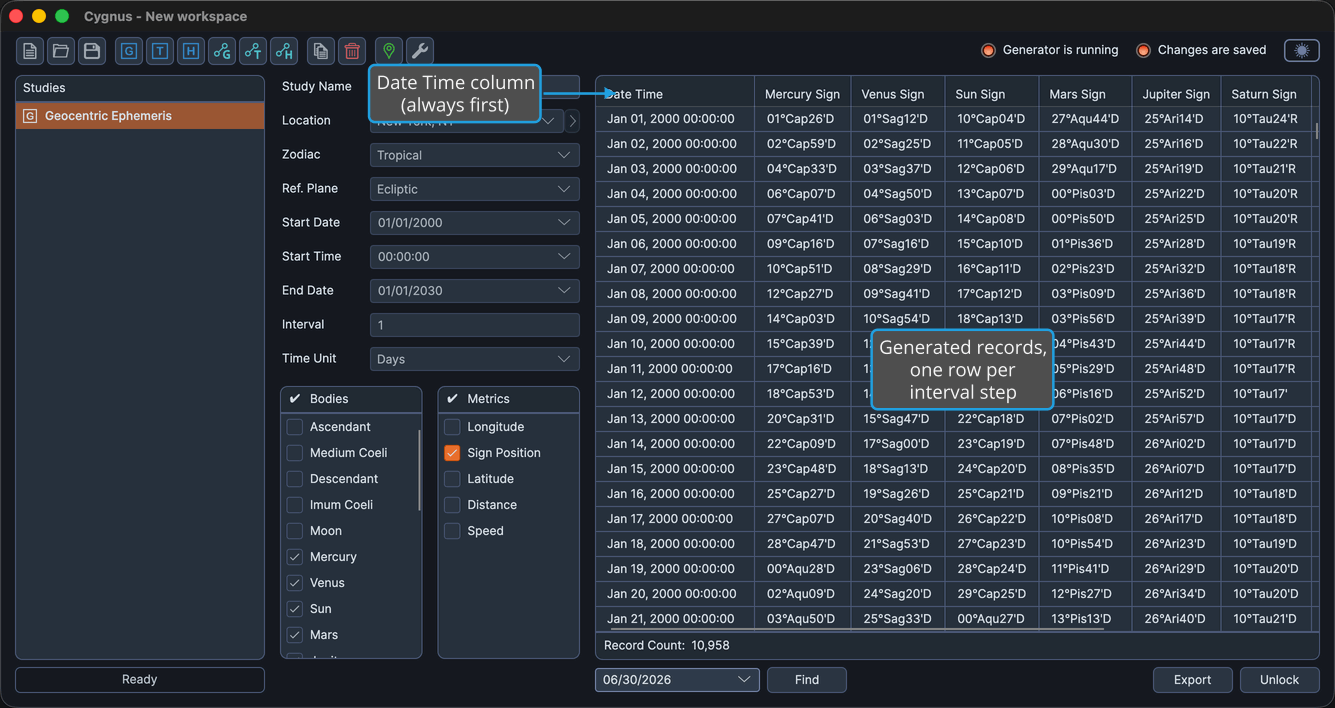
Column structure
The ephemeris table is built from a fixed first column plus one column for each metric you select. Because the exact columns depend on your body and metric selections and the study's reference plane, the table below shows the column structure rather than a fixed list of columns.
| Block | Column | Description |
|---|---|---|
| Fixed | Date Time | The date and time of the record, shown in the location's time zone. Always the first column. |
| Repeating (per selected metric) | {Metric} | One column for each selected body metric, and, on aspect studies, each selected aspect metric. |
The body-position column labels reflect the study's reference plane (for example, Longitude under the ecliptic plane, or Right Asc under the equatorial plane). To choose which metric columns appear, use the Body Metrics List and, on aspect studies, the Aspect Metrics List.
Resizing a Column
To change a column's width:
- Drag the right edge of the column header left or right.
The ephemeris table cannot be sorted by clicking a column header. To find a particular record, use Find Record by Date.