Sign Ingresses Study
Sign changes frame most interpretive work, and the Sign Ingresses study delivers a clean list of them without your having to enter thirty-degree multiples by hand. It generates an event each time a body's ecliptic longitude, or its right ascension in equatorial frames, crosses a sign boundary at a multiple of 30°.
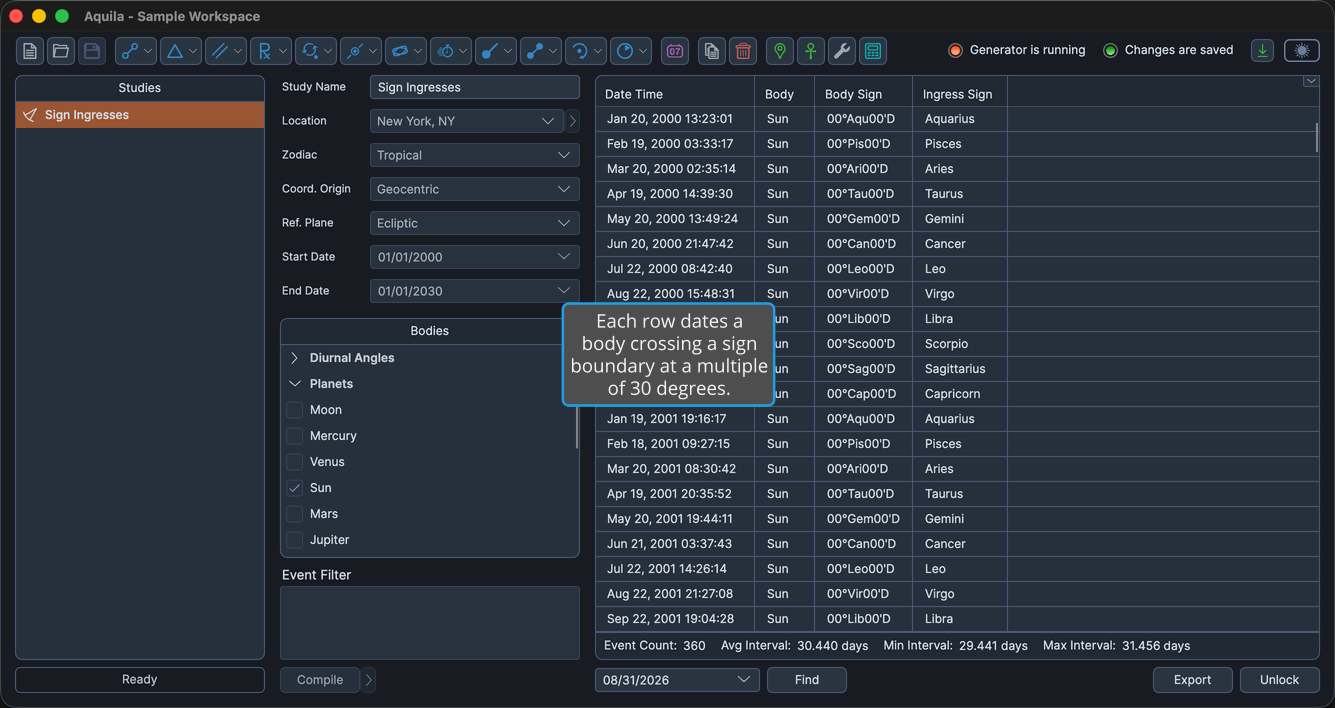
Each event records the body, its position at the boundary, and the sign it is entering.
Create a Sign Ingresses Study
To add a Sign Ingresses study to the current workspace:
- Click Mundane Studies → Critical Degree Transits on the menu bar.
- Click Sign Ingresses in the Critical Degree Transits submenu.
Alternatively, click the Ingress Studies drop-down button on the toolbar and select Sign Ingresses from its flyout.
The new study appears at the bottom of the Studies list and is selected automatically, so its settings open immediately. It takes its name from the study type.
What This Study Finds
An event is generated at the exact moment a body crosses a sign boundary, meaning a multiple of 30° measured in ecliptic longitude, or in right ascension when the study is set to an equatorial reference plane. All twelve boundaries are covered.
The boundaries themselves need no configuration, which is what separates this study from the Hotspot Transits Study. That study can produce the same crossings if you type the thirty-degree multiples into its Hotspot Degrees table, but here they are built in.
The settings column holds the Study Name, the ephemeris settings and the study date range, followed by a single Bodies selection list holding the bodies whose ingresses are wanted.
Events Table Columns
The events table lists one row per ingress. Several columns are hidden by default, as the table notes. Right-click any column header to show or hide a column, as described in Choose Events Table Columns. The coordinate columns follow the study's Reference Plane: their headers read Longitude and Latitude in the ecliptic plane, and Right Asc and Declination in the equatorial plane. The table below gives the ecliptic-plane headers.
| Column | Description |
|---|---|
| Date Time | Date and time of the ingress, in the application's long date and time format. Always the first column, and it cannot be moved. Visible by default. |
| Body | Name of the celestial body. Visible by default. |
| Body Longitude | The body's primary coordinate, in degrees. Hidden by default. |
| Body Sign | The body's position as degrees, sign and minutes of the zodiac. Visible by default. |
| Body Latitude | The body's secondary coordinate, in degrees. Hidden by default. |
| Body Distance | The body's radial distance, in astronomical units (AU). Hidden by default. |
| Body Speed | The body's speed, in degrees per day. Hidden by default. |
| Sign Boundary Longitude | The sign boundary that was crossed, as a primary coordinate in degrees. Hidden by default. |
| Ingress Sign | The sign being entered, expressed as degrees, sign and minutes of the zodiac. Visible by default. |
| Event Interval | Elapsed time since the previous event in the list. Hidden by default. |