Lunar Eclipses Study
Lunar eclipse dates complete the eclipse picture alongside the solar ones, and a practitioner working a period wants both lists in front of them. The Lunar Eclipses study produces the lunar half.
The study generates an event for every lunar eclipse that falls in the date range, recording where the eclipse fell in the zodiac and which Saros series it belongs to.
Create a Lunar Eclipses Study
To add a Lunar Eclipses study to the current workspace:
- Click Mundane Studies → Eclipses on the menu bar.
- Click Lunar Eclipses in the Eclipses submenu.
Alternatively, click the Lunar Eclipse Studies drop-down button on the toolbar and select Lunar Eclipses from its flyout.
The new study appears at the bottom of the Studies list and is selected automatically, so its settings open immediately. It takes its name from the study type.
What This Study Finds
The study finds every lunar eclipse in the date range you set, whatever its kind, and records the moment of each one. Total, partial and penumbral eclipses carry different weight in practice, so an Eclipse Types list is provided for restricting the study to the kinds you are interested in.
There are no body selection lists on this study, since the bodies involved in an eclipse are fixed. The Eclipse Types list is the only selection the technique itself calls for, alongside the date range you are searching.
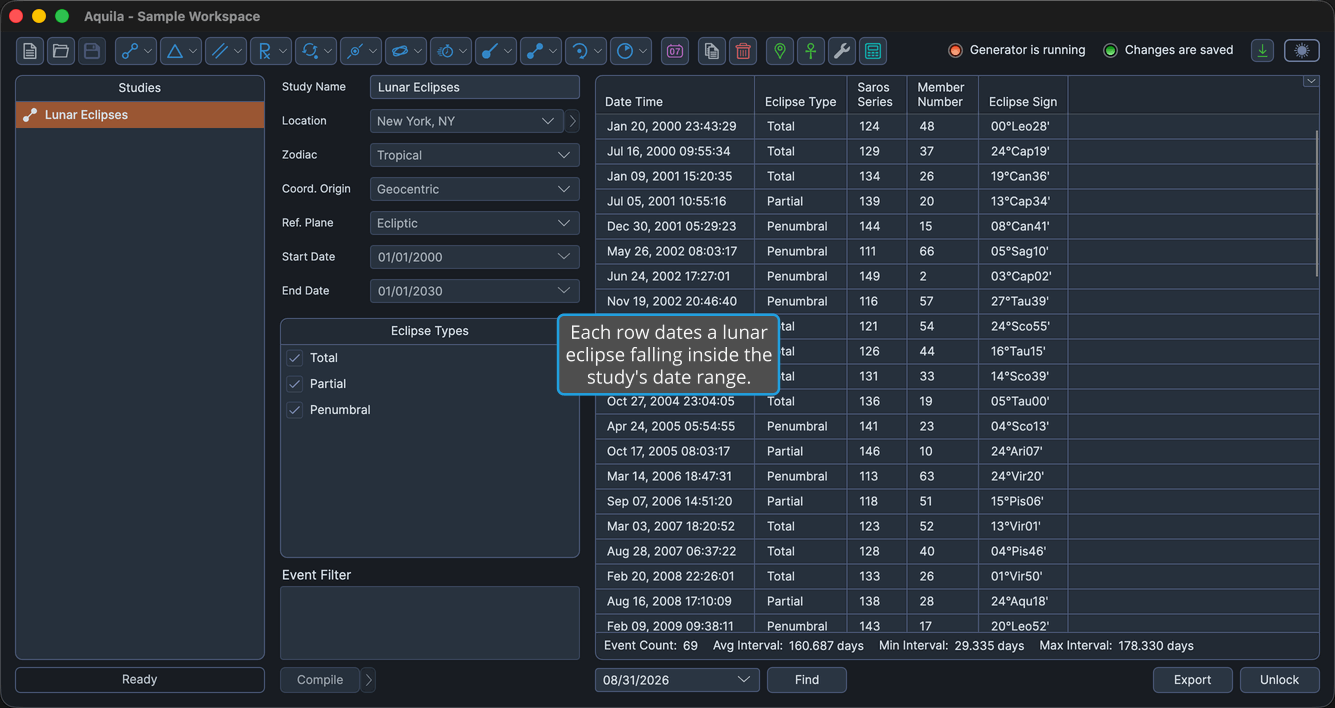
Events Table Columns
The events table lists one row per eclipse. Several columns are hidden by default, as the table notes. Right-click any column header to show or hide a column, as described in Choose Events Table Columns. The header text of the coordinate columns follows the study's Reference Plane: they read Longitude and Latitude in the ecliptic plane and Right Asc and Declination in the equatorial plane. The table below uses the ecliptic-plane headers.
| Column | Description |
|---|---|
| Date Time | Date and time the event perfects, in the application's long date-time format. Always the first column, and it cannot be moved. Visible by default. |
| Eclipse Type | The kind of eclipse the event records. Visible by default. |
| Saros Series | The eclipse's Saros series, as a whole number. Visible by default. |
| Member Number | The eclipse's member number within that series, as a whole number. Visible by default. |
| Eclipse Longitude | The eclipse's primary coordinate in degrees. Hidden by default. |
| Eclipse Sign | The eclipse's position as degrees, sign and minutes of the zodiac. Visible by default. |
| Eclipse Latitude | The eclipse's secondary coordinate in degrees. Hidden by default. |
| Event Interval | Elapsed time since the previous event in the list. Hidden by default. |