Secondary Progression Settings
Secondary Progression Settings let you choose the progression rate, day type and angle method that a Secondary Progressions Study works with. Open the Progressions tab and choose a Rate, Day Type and Angle Method. For the User-Defined Rate, type the rate in the User Rate box.
The Progressions tab also holds the Year drop-down, described in Year Reckoning. The settings on this page are disabled while the study is locked (Unlock Study).
Configure the Progression Rate and Day Type
Choose how fast the study's progressed clock moves and, for a day-based rate, which kind of day it compresses. The study must be selected in the Studies list (Open an Event Generator Study) and unlocked.
- Click the Progressions tab.
- Select a rate in the Rate drop-down.
- If you chose a secondary or tertiary rate, select a day type in the Day Type drop-down.
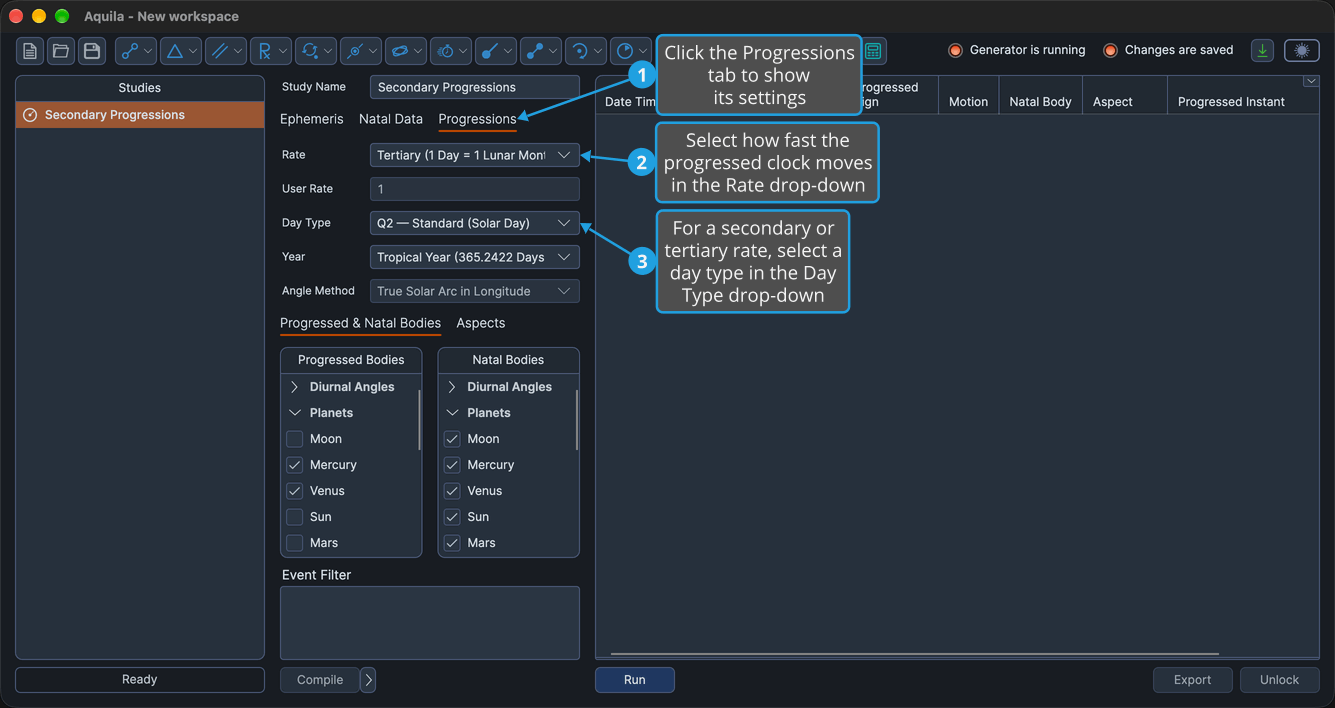
The drop-downs show the chosen settings, and the study has unsaved changes. The study progresses at the chosen rate the next time it generates events.
Set a User-Defined Progression Rate
Progress the study at a rate of your own, in progressed days per year of life. The study must be selected and unlocked.
- Click the Progressions tab.
- Select User-Defined Rate in the Rate drop-down.
- Click in the User Rate box.
- Type the rate in progressed days per year of life.
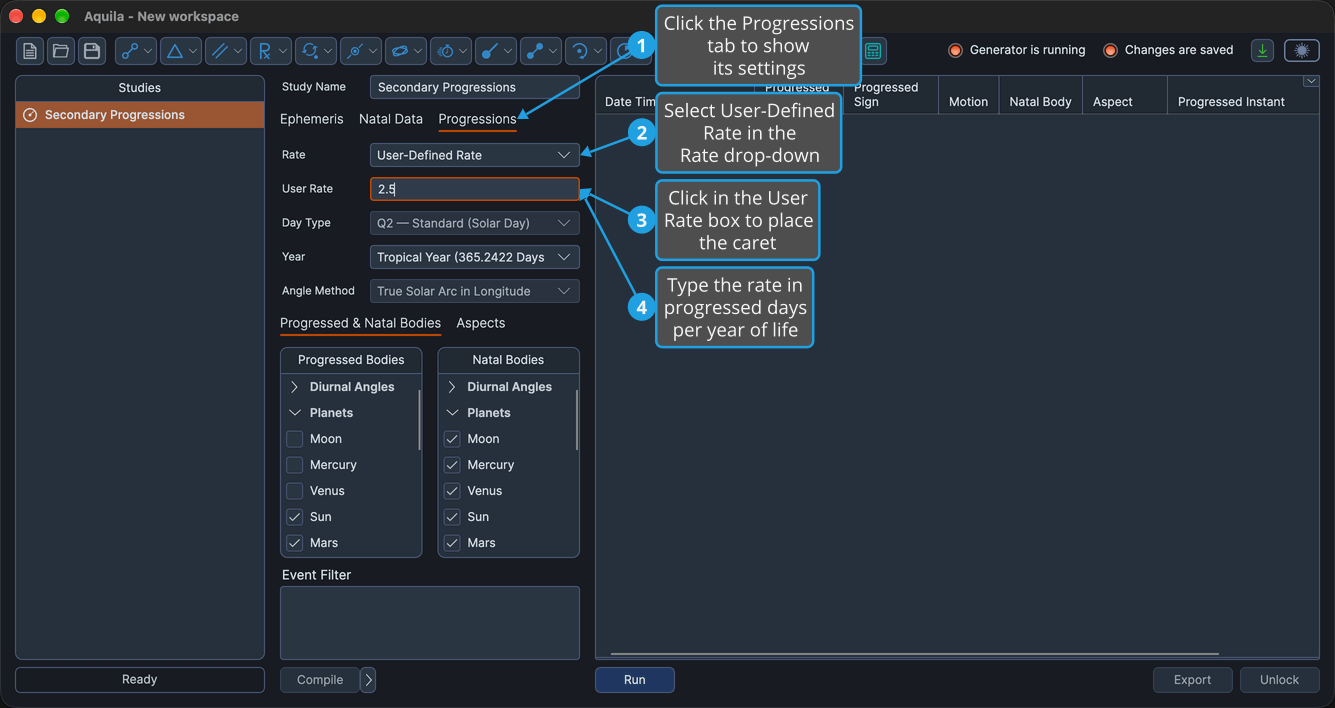
The User Rate box accepts values from 0.01 to 366, and it is available only while Rate is User-Defined Rate and the study is unlocked. A user-defined rate is applied literally, so the Day Type drop-down is unavailable with it. The study has unsaved changes and progresses at the typed rate the next time it generates events.
Choose the Progressed Angle Method
The Angle Method setting governs how progressed diurnal angles advance. The drop-down already shows the study's saved method, so change it only when you want a different one. The study must be selected and unlocked, and a diurnal angle must be checked in its Progressed Bodies list on the Progressed & Natal Bodies tab (Bodies List). Until then, the drop-down is unavailable.
Click the Progressions tab to reach the setting.
- Angle Method: select how progressed diurnal angles advance.
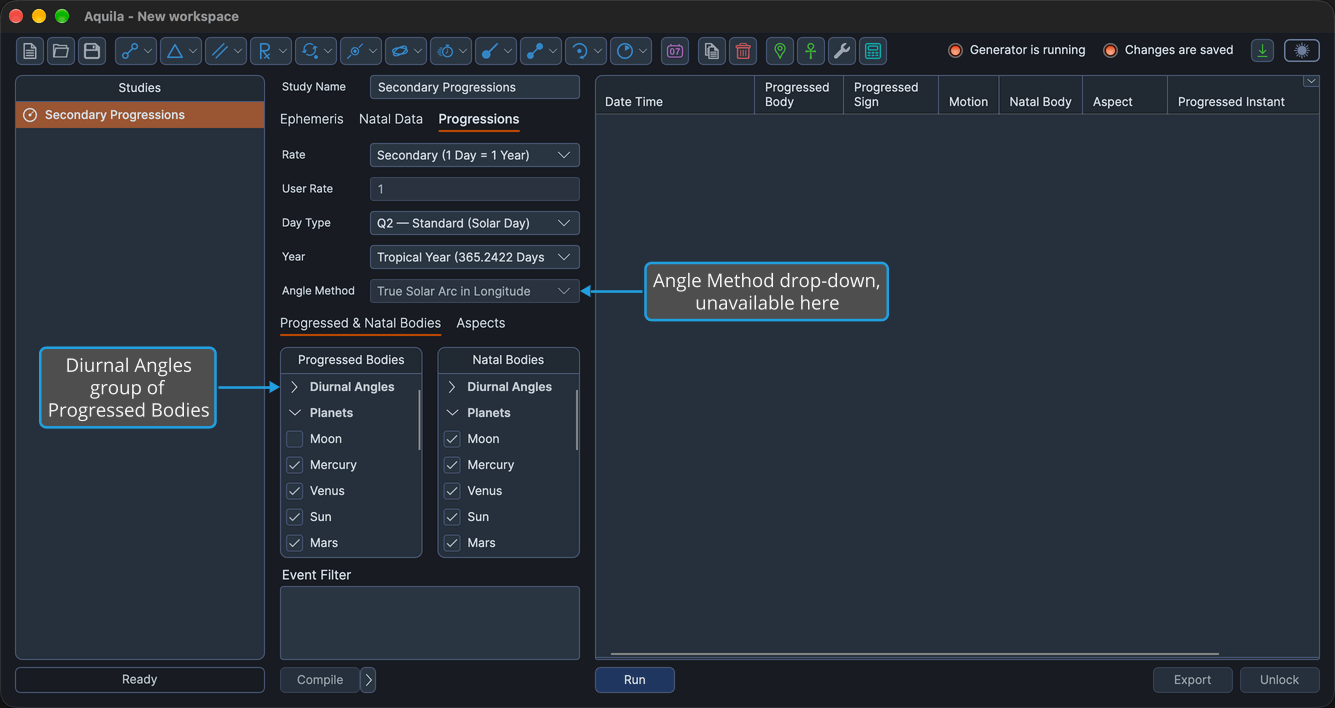
The study has unsaved changes, and its progressed diurnal angles advance by the chosen method the next time it generates events.
Available Options
Rate
How many progressed days stand for a year of life. The rate you choose decides which dependent settings are available: User Rate only for User-Defined Rate, and Day Type only for the secondary and tertiary rates.
| Option | Description |
|---|---|
| Secondary (1 Day = 1 Year) | One day of ephemeris time for each year of life. |
| Tertiary (1 Day = 1 Lunar Month) | One day of ephemeris time for each lunar month of life. |
| Minor (1 Lunar Month = 1 Year) | One lunar month of ephemeris time for each year of life. Built on the month, so Day Type does not apply. |
| User-Defined Rate | The progressed days per year of life you type in the User Rate box, from 0.01 to 366. Applied literally, so Day Type does not apply. |
Day Type
Which day of ephemeris time the day-based rates count. The drop-down is available only while Rate is Secondary (1 Day = 1 Year) or Tertiary (1 Day = 1 Lunar Month).
| Option | Description |
|---|---|
| Q2 — Standard (Solar Day) | The rate counts solar days. |
| Q1 — Bija (Sidereal Day) | The rate counts sidereal days. |
Angle Method
How the progressed Midheaven advances when a diurnal angle is checked as a progressed body. The drop-down is unavailable, not hidden, until a diurnal angle is checked in the Progressed Bodies list, because the setting stays part of the saved study.
| Option | Description |
|---|---|
| True Solar Arc in Longitude | Advances the Midheaven by the progressed Sun's actual advance in ecliptic longitude. |
| True Solar Arc in Right Ascension | Advances the right ascension of the meridian by the progressed Sun's actual advance in right ascension. |
| Naibod in Longitude | Advances the Midheaven by the Sun's mean motion in ecliptic longitude. |
| Naibod in Right Ascension | Advances the right ascension of the meridian by the Sun's mean motion. |