Secondary Progressions Study
Secondary progressions are a standard part of most predictive practice, and what practitioners want from them is the exact date a progressed contact perfects. The Secondary Progressions study reads the ephemeris on the classical day-for-a-year clock and reports each of those moments for the natal record you select.
The idea is straightforward: the sky on the day after birth is taken to describe the first year of life, the sky two days after birth the second year, and so on. Progressed positions are therefore genuine ephemeris positions read at a compressed rate, which is what sets this technique apart from the symbolic directions. The progressed inner planets really do slow down, station and turn retrograde, and the study reports those effects faithfully.
Create a Secondary Progressions Study
To add a Secondary Progressions study to the current workspace:
- Click Direction Studies → Secondary Progressions on the menu bar.
Alternatively, click the Direction Studies drop-down button on the toolbar and select Secondary Progressions from its flyout.
The new study appears at the bottom of the Studies list and is selected automatically, so its settings open immediately. It takes its name from the study type.
What This Study Finds
The study generates an event each time a progressed body, the natal sky re-read at one day per year of life, perfects an aspect to the natal place of another body. The progressed body is read from the ephemeris at the progressed instant; the natal body is the point whose natal place the aspect is aimed at.
Unlike its two Direction Studies siblings, this study searches through time rather than solving a single arc. Progressed Mercury, Venus and Mars retrograde and station, so one combination of progressed body, natal body and aspect may perfect once or three times, and only a genuine search finds them all. Every pass is reported and none is removed as a duplicate. The date range is a real search window here, so a wider range does mean more work, though the work stays small because the search runs on the compressed axis: a hundred-year window is roughly a hundred days of ephemeris time at the secondary rate.
Events are perfection moments, the exact instant an aspect becomes exact, and there is no orb setting anywhere in the study. The mapping between real time and progressed time is linear and exactly invertible, so each event is reported to the minute rather than only to the day, and the Progressed Instant column gives the ephemeris moment the progressed positions were read from. Elapsed years of life are non-negative by definition, so a date range that begins before the natal instant is searched only from the natal instant onward.
The technique is wholly ecliptic, and every position, natal and progressed alike, is sampled at the natal record's own location; the study's Location supplies only the time zone the resulting dates are shown in. Settings are laid out on two tab controls: the upper one carries Ephemeris, Natal Data and Progressions, and the lower one carries Progressed & Natal Bodies and Aspects. The Ephemeris tab hides its Reference Plane row, because progressed positions are matched to natal places in longitude and a plane choice could not change a result.
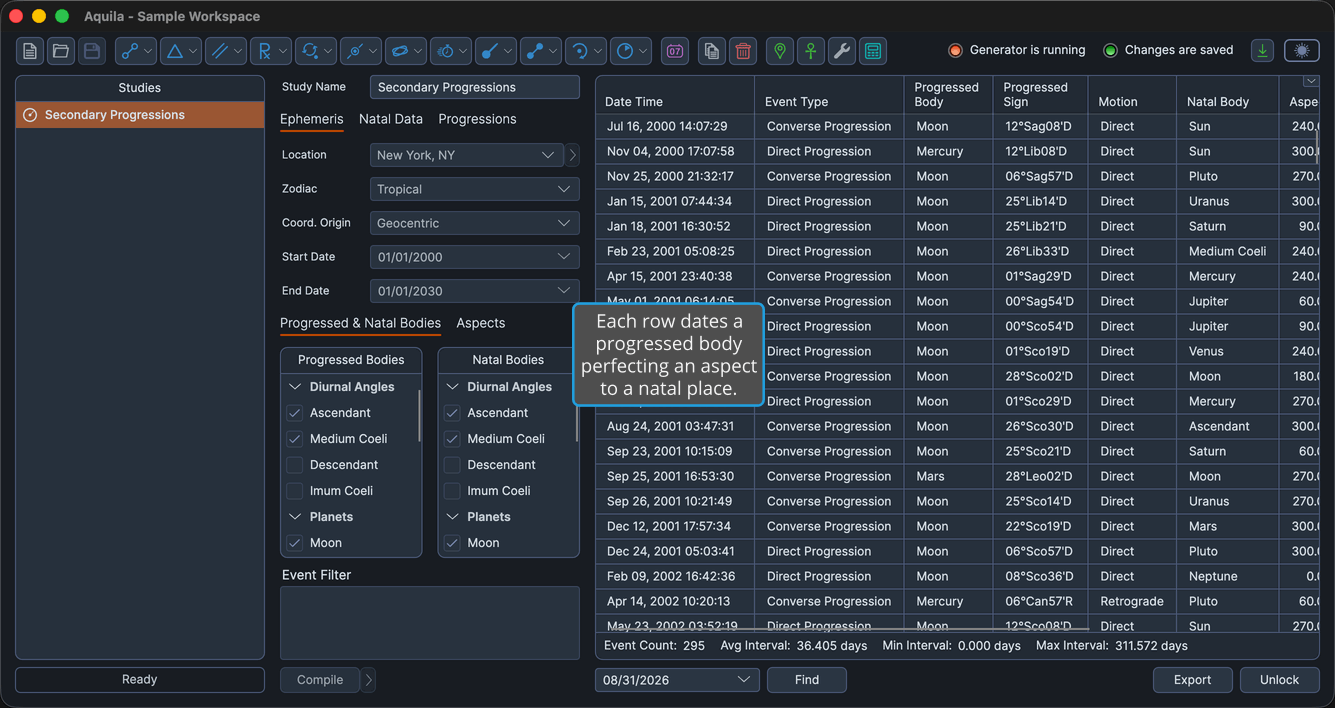
Events Table Columns
The events table shows the columns below. Several columns are hidden by default, as the table notes. Right-click any column header to show or hide a column, as described in Choose Events Table Columns.
| Column | Description |
|---|---|
| Date Time | The real date and time the progressed aspect perfects, resolved to the minute and shown in the application's long date-time format. Always the first column, and it cannot be moved. Visible by default. |
| Event Type | Whether the row is a direct progression or a converse progression. Visible by default. |
| Progressed Body | The body whose progressed position is tracked. Visible by default. |
| Progressed Longitude | The progressed body's ecliptic longitude at the event, in degrees. Hidden by default. |
| Progressed Sign | The progressed body's position at the event, as degrees, sign and minutes of the zodiac. Visible by default. |
| Motion | Whether the progressed body is direct, retrograde or stationary at that moment. Visible by default. |
| Natal Body | The point whose natal place the aspect is aimed at. Visible by default. |
| Natal Longitude | The natal body's ecliptic longitude in degrees. Hidden by default. |
| Natal Sign | The natal body's position as degrees, sign and minutes of the zodiac. Hidden by default. |
| Aspect | The cycle angle applied to the progressed body, in degrees. Visible by default. |
| Progressed Instant | The ephemeris moment the progressed positions were read from. Visible by default. |
| Age at Event | Elapsed years of life at the event, counted in the study's Year reckoning. Visible by default. |
| Event Interval | Elapsed time since the previous event in the list. Hidden by default. |
A progressed angle has no ephemeris motion of its own, only the symbolic advance the Angle Method applies, so a converse progressed Midheaven, Imum Coeli, Ascendant or Descendant reports Retrograde in the Motion column and carries the R marker in the Progressed Sign column. A progressed planet, by contrast, reports its own ephemeris motion at the progressed instant.