Unlock Timeline
A timeline is a merged view of a chosen set of studies, and the set is usually the thing you want to change, adding a technique or dropping one. Unlock returns a loaded Timeline study to its editable state so a different combination of source studies can be chosen and loaded, without deleting the study and building it again.
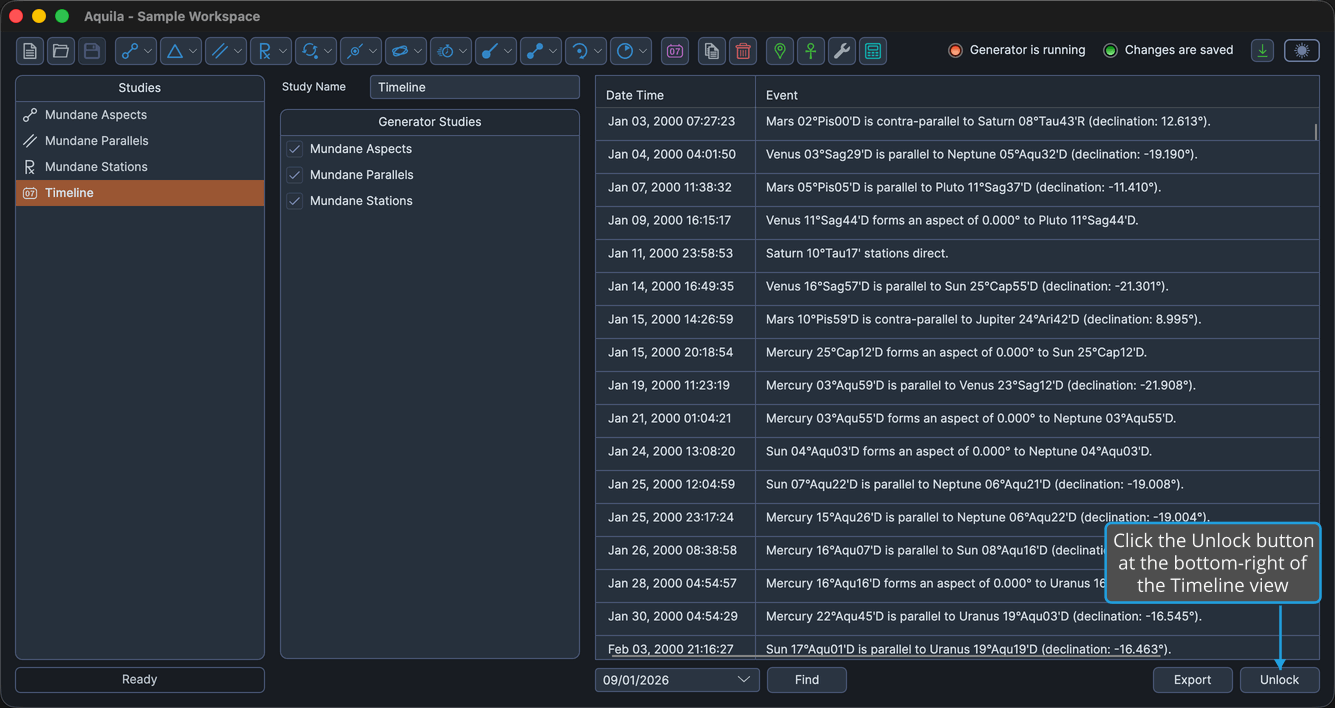
Loading locks the timeline: the Generator Studies list becomes read-only and the Load button gives way to the Find controls. The Unlock button is at the bottom-right of the Timeline view, beside Export, and is enabled only while the timeline is locked.
Unlock discards the loaded events immediately. There is no confirmation prompt, so a click on Unlock empties the Timeline table.
Unlock the Timeline
To return a loaded timeline to its editable state:
- Click the Unlock button at the bottom-right of the Timeline view.
Aquila discards the loaded events, the Generator Studies list becomes editable again, the Find controls give way to the Load button, and the status area reports "Study Unlocked." Adjust the checkboxes in the Generator Studies list, then click Load again to rebuild the timeline from the new combination.
How This Differs from Unlocking a Study
Unlock Timeline is a distinct command from the generator studies' Unlock. Unlock Study asks you to confirm before deleting a generator study's generated events; the Timeline's Unlock does not ask. Nothing is lost that cannot be rebuilt, because a Timeline study holds no results of its own: clicking Load again merges the source studies' events afresh.