Stelliums Study
A pile-up of three bodies concentrates a great deal of symbolism in one place, and the Stelliums study tells you when one occurs and which bodies are in it. It generates an event each time three transiting bodies are conjunct within orb.
Each event records all three bodies, their positions at the moment the grouping closes, and the separation between each pair.
Create a Stelliums Study
To add a Stelliums study to the current workspace:
- Click Mundane Studies → Aspect Patterns on the menu bar.
- Click Stelliums in the Aspect Patterns submenu.
Alternatively, click the Aspect Patterns drop-down button on the toolbar and select Stelliums from its flyout.
The new study appears at the bottom of the Studies list and is selected automatically, so its settings open immediately. It takes its name from the study type.
What This Study Finds
An event is generated when three transiting bodies are conjunct within orb, gathering in one part of the zodiac at the same time. Each of the three contacts is judged against the Aspect Orb, so the orb setting controls how tight the grouping has to be before an event is generated.
Bodies are drawn from three lists, and the study tests one body from each. The Aspect Orb is one of the shared Orb Settings that several studies carry.
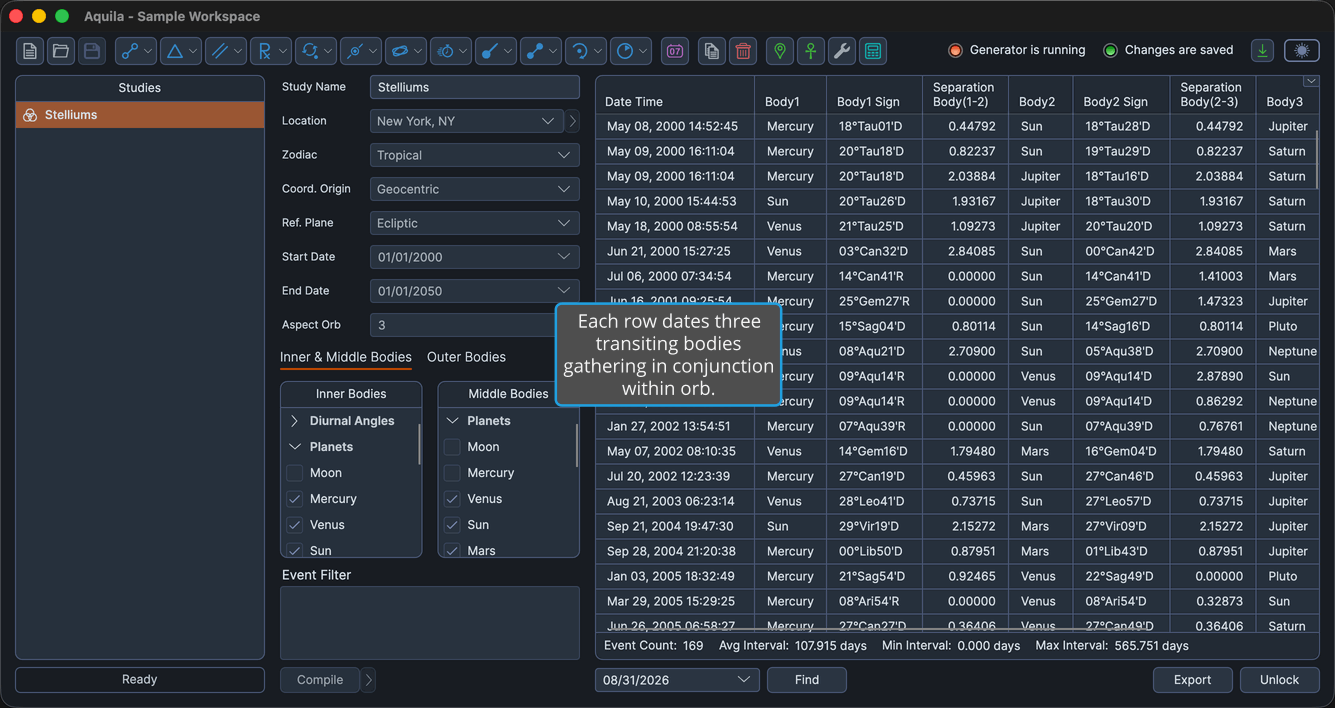
The settings column holds the Study Name, the ephemeris settings, the study date range and the Aspect Orb field, and beneath them two tabs. Inner & Middle Bodies holds the Inner Bodies and Middle Bodies selection lists, and Outer Bodies holds the Outer Bodies selection list.
Events Table Columns
The events table lists one row per grouping. Several columns are hidden by default, as the table notes. Right-click any column header to show or hide a column, as described in Choose Events Table Columns. The coordinate columns follow the study's Reference Plane: their headers read Longitude and Latitude in the ecliptic plane, and Right Asc and Declination in the equatorial plane. The table below gives the ecliptic-plane headers.
| Column | Description |
|---|---|
| Date Time | Date and time the grouping perfects, in the application's long date and time format. Always the first column, and it cannot be moved. Visible by default. |
| Body1 | Name of the first body in the grouping. Visible by default. |
| Body1 Longitude | The first body's primary coordinate, in degrees. Hidden by default. |
| Body1 Sign | The first body's position as degrees, sign and minutes of the zodiac. Visible by default. |
| Body1 Latitude | The first body's secondary coordinate, in degrees. Hidden by default. |
| Body1 Distance | The first body's radial distance, in astronomical units (AU). Hidden by default. |
| Body1 Speed | The first body's speed, in degrees per day. Hidden by default. |
| Separation Body(1-2) | Angular separation between the first and second bodies, in degrees. Visible by default. |
| Body2 | Name of the second body in the grouping. Visible by default. |
| Body2 Longitude | The second body's primary coordinate, in degrees. Hidden by default. |
| Body2 Sign | The second body's position as degrees, sign and minutes of the zodiac. Visible by default. |
| Body2 Latitude | The second body's secondary coordinate, in degrees. Hidden by default. |
| Body2 Distance | The second body's radial distance, in astronomical units (AU). Hidden by default. |
| Body2 Speed | The second body's speed, in degrees per day. Hidden by default. |
| Separation Body(2-3) | Angular separation between the second and third bodies, in degrees. Visible by default. |
| Body3 | Name of the third body in the grouping. Visible by default. |
| Body3 Longitude | The third body's primary coordinate, in degrees. Hidden by default. |
| Body3 Sign | The third body's position as degrees, sign and minutes of the zodiac. Visible by default. |
| Body3 Latitude | The third body's secondary coordinate, in degrees. Hidden by default. |
| Body3 Distance | The third body's radial distance, in astronomical units (AU). Hidden by default. |
| Body3 Speed | The third body's speed, in degrees per day. Hidden by default. |
| Separation Body(3-1) | Angular separation between the third and first bodies, in degrees. Visible by default. |
| Event Interval | Elapsed time since the previous event in the list. Hidden by default. |