Reorder Events Table Columns
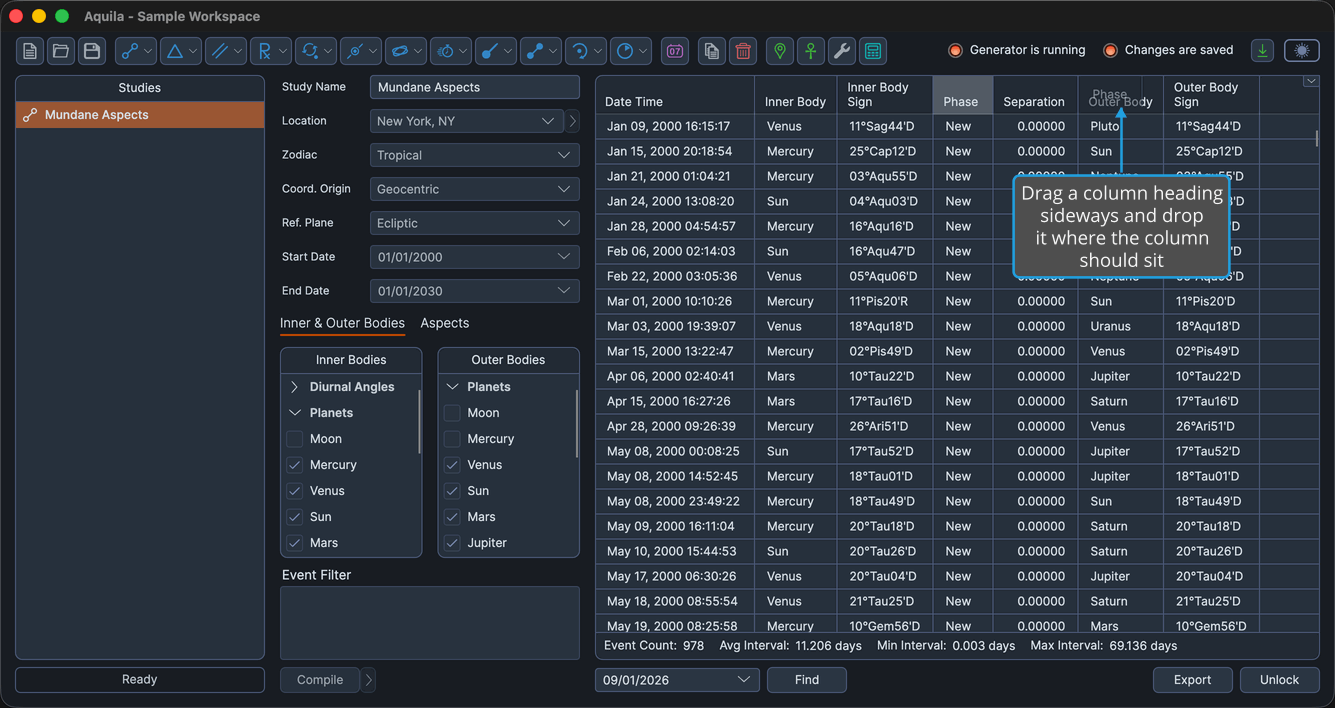
The metrics that matter for a given question are more useful beside the date than scrolled off to the right. Dragging a column header into a new position changes the left-to-right order of the events table so the columns you are reading sit together.
Move a Column
To change a column's position in the events table:
- Drag its column header sideways and drop it where the column should sit.
The dragged column takes its new position and the columns it passed shift to make room.
The Date Time column cannot be reordered. It is always the first column, and if another column is dropped in front of it, Date Time returns to the far left.
Keep the New Order
The order you arrange becomes part of the study view's table layout, alongside which columns are visible. That layout can be saved as the default for the study type, so every future study of that type opens with the same arrangement. See Events Table Layout Menu.
Column order also shapes what leaves the table. An export writes the columns in the order they currently sit in, so arranging them here arranges the CSV file. See Export Events.