Find Nearest Event
With thousands of rows in the events table, scrolling to a particular period by hand is impractical. Find takes a date and lands the table directly on the event closest to it.
A date field and a Find button appear at the bottom-left of the results column once the study's events have been generated, in the place the Run button occupied. They stay there for as long as the study is locked; unlocking the study discards its events and brings the Run button back.
Jump to a Date
To land on the event closest to a date of interest:
- Type the target date into the Find date field at the bottom-left of the results column.
- Click the Find button.
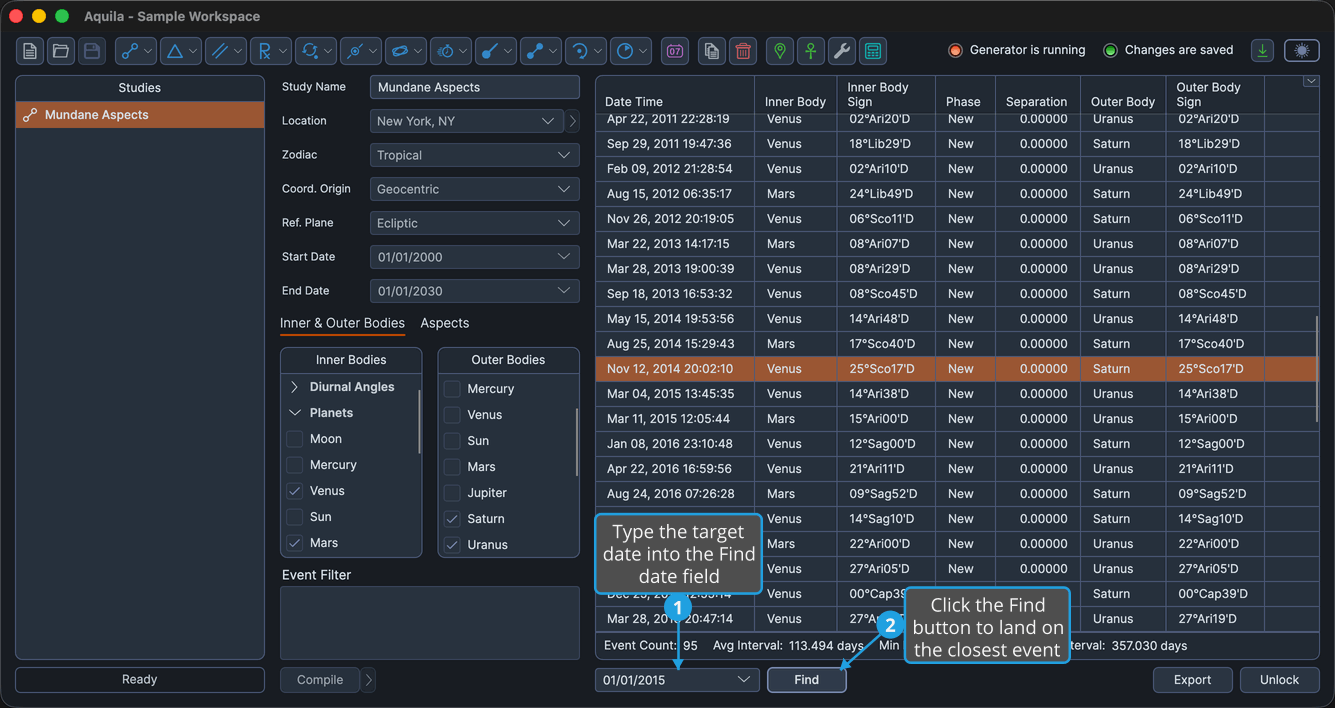
The events table scrolls to the event closest to the date you entered and selects that row.
Pressing Enter in the date field does the same thing as clicking Find, so you can type a date and search without moving to the button.
The date searched for does not have to be one the study found an event on. Find selects whichever event lies closest to it, before or after.