Natal Data Configuration
Every transit study presents a Natal Data tab that is for the selection of the natal record the study evaluates events against. The tab also contains the Natal Date and Natal Time fields, which are populated directly from the selected natal record but remain editable for "what-if" experimentation, and the Transit Orb that controls how close transiting bodies must be to natal positions to count as activations.
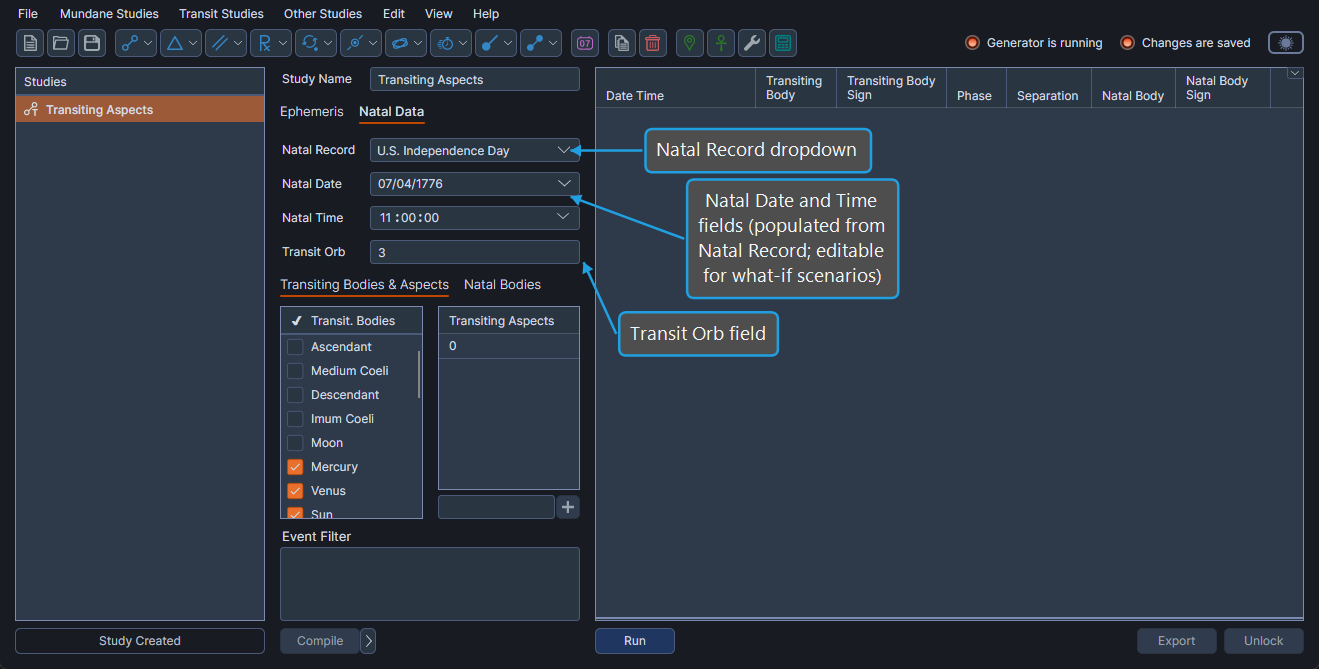
A natal record is a stored set of birth data (date, time, location). It is not a natal chart.
Configure Natal Data
To configure the natal data on a transit study:
- Click the Natal Data tab.
- Set the Natal Record, Natal Date, Natal Time, and Transit Orb fields to the desired values.
| Field | Description |
|---|---|
| Natal Record | A searchable dropdown listing every record from the Natal Records Editor. Selecting a record populates the Natal Date and Natal Time. |
| Natal Date | The date associated with the selected natal record. Editable for what-if exploration; under normal circumstances should remain unchanged. |
| Natal Time | The time associated with the selected natal record. Editable for what-if exploration; under normal circumstances should remain unchanged. |
| Transit Orb | The maximum angular distance (in degrees) by which a transiting body may differ from a natal position to count as an activation. |
Select Natal Record
To associate the active transit study with a particular natal record:
- Select the desired record in the Natal Record dropdown.
The Natal Record dropdown is searchable: type a few characters of the record's name to filter the list. The Natal Date and Natal Time fields populate from the selected record.
Override Natal Date
The Natal Date field is populated from the selected natal record but can be edited for what-if experimentation without changing the underlying record.
To override the Natal Date:
- Set the Natal Date field to the desired date.
Under normal circumstances, leave the Natal Date as populated by the selected record.
Override Natal Time
The Natal Time field is populated from the selected natal record but can be edited for what-if experimentation without changing the underlying record.
To override the Natal Time:
- Set the Natal Time field to the desired time.
Under normal circumstances, leave the Natal Time as populated by the selected record.