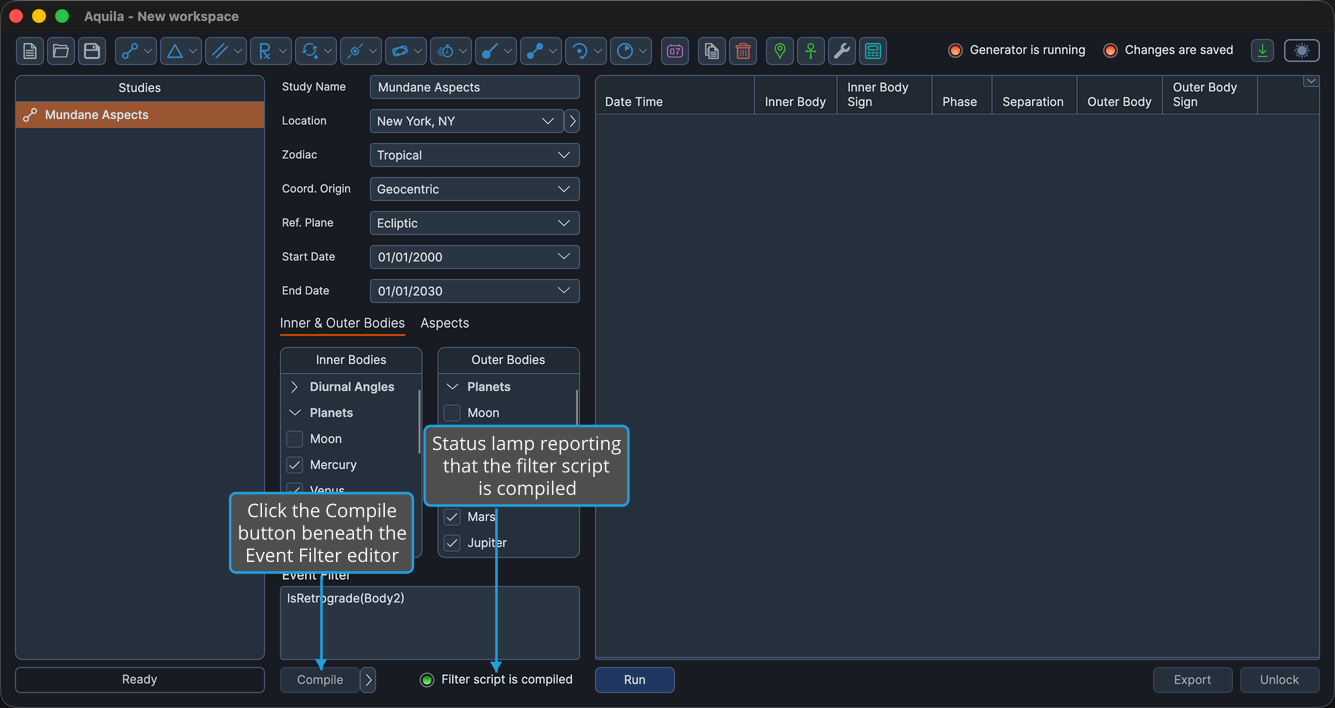
Compile Filter Script
An invalid filter expression is worth catching before committing to a long generation, and while the expression is still fresh in mind. The Compile button, beneath the Event Filter editor, checks the expression and prepares it for use by the study's event generation.
A study's filter must compile before its events can be generated. The filter is part of the study's configuration, so it is saved with the study and comes back when the workspace is reopened, but a change to the text has to be compiled again before the study will generate.
Compile the Event Filter
To check the expression and prepare it for use:
- Click the Compile button beneath the Event Filter editor.
The expression is compiled, and the status lamp to the right of the button reports that the filter script is compiled. The lamp also reads compiled when the editor is empty, which is the normal state for a study that uses no filter.
The lamp is the signal, not the button. The Compile button carries no color state of its own, so read the lamp to its right to know where the filter stands.
The button is disabled while the study is locked. Click the Unlock button to edit and recompile a filter on a study whose events have already been generated. See Unlock Study.