Event Type Selection
The Event Type drop-down lets a study generate only the kind of event you are researching. Open the drop-down and choose one kind of event, or the "All" choice to keep every kind.
Fourteen studies have the drop-down. Its first choice always keeps every kind of event the study can find; the other choices are the study's own kinds of event, such as parallels or contraparallels, direct or retrograde stations, or minimums or maximums.
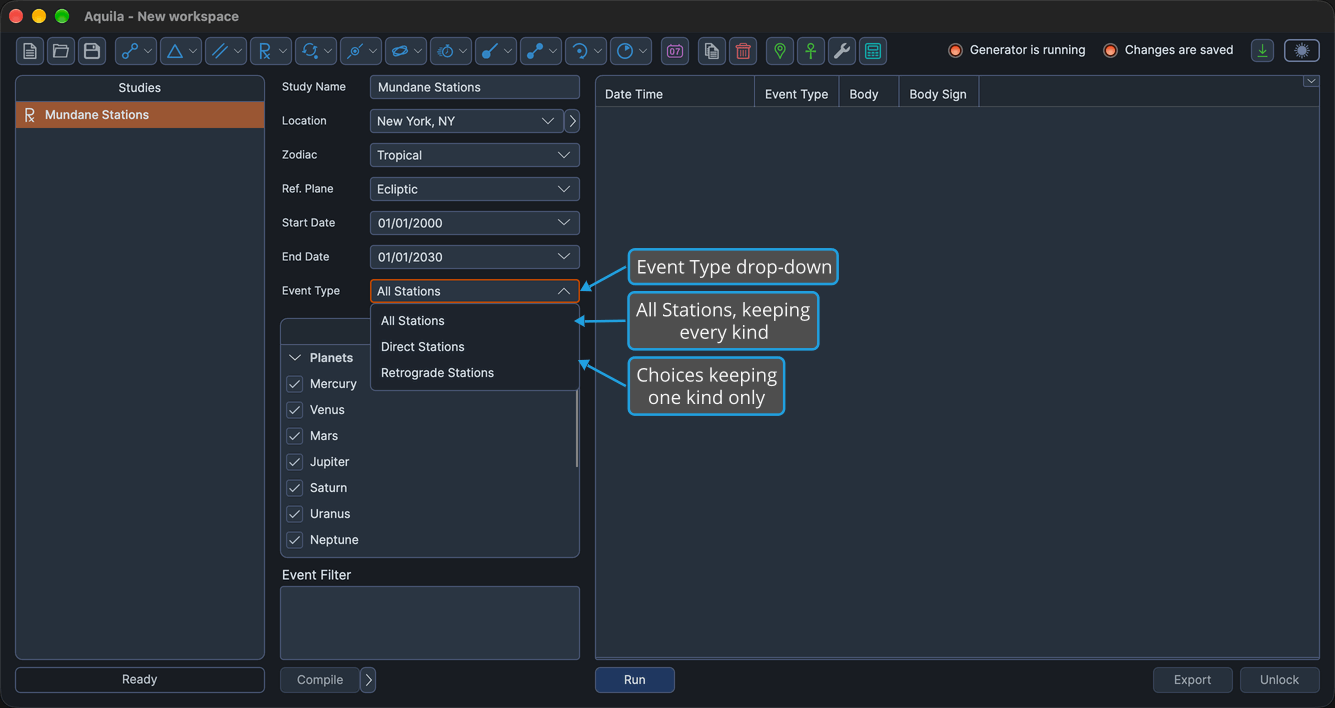
Choose the Event Type
Open the study first (Open an Event Generator Study). On nine studies the drop-down is among the study's settings; on five it is on a tab, which you click first. The table below gives the place for each study. The drop-down is disabled while the study is locked. To change the event type of a study that has generated its events, unlock it first (Unlock Study).
To make the study keep every kind of event, or only one kind:
- Select the kind of event to keep from the Event Type drop-down.
The drop-down shows your choice, and the next time you generate events the study keeps only events of that kind, or every kind for the first choice.
Event Type Choices by Study
The first choice in each list keeps every kind of event.
| Study | Choices | Where to Find It |
|---|---|---|
| Mundane Parallels Study | All Aspects, Contraparallel Aspects, Parallel Aspects | Study settings |
| Transiting Parallels Study | All Transiting Aspects, Transiting Parallels, Transiting Contraparallels | Event & Natal Data tab |
| Parallel Activations Study | All Aspect Activations, Parallel Activations, Contraparallel Activations | Event & Natal Data tab |
| Mundane Stations Study | All Stations, Direct Stations, Retrograde Stations | Study settings |
| Station Hotspots Study | All Station Hotspots, Retrograde Station Hotspots, Direct Station Hotspots | Study settings |
| Station Activations Study | All Station Activations, Retrograde Activations, Direct Activations | Event & Natal Data tab |
| Nodal Transits Study | All Nodal Transits, Ascending Node Transits, Descending Node Transits | Study settings |
| Latitude Extrema Study | Depend on the reference plane, as listed in Latitude Extrema Choices | Study settings |
| Speed Extrema Study | All Speed Extrema, Speed Minimums, Speed Maximums | Study settings |
| Solar Limit Transits Study | All Limit Transits, Northern Limit Transits, Southern Limit Transits | Study settings |
| Heliacal Phenomenon Study | All Heliacal Phenomenon, Heliacal Risings, Heliacal Settings | Study settings |
| Maximum Elongations Study | All Max Elongations, Max Western Elongations, Max Eastern Elongations | Study settings |
| Primary Directions Study | All Directions, Direct Directions, Converse Directions | Directions tab |
| Profections Study | All Profections, Annual Profections, Annual & Monthly Profections, Monthly Profections, Daily Profections | Profections tab |
On two studies the choice also changes which other settings you can use:
- On the Primary Directions study, choosing Direct Directions makes the Converse drop-down unavailable (Primary Direction Settings).
- On the Profections study, the Monthly Method drop-down is unavailable for Annual Profections, and the Daily Method drop-down is available only for All Profections and Daily Profections (Profection Settings).
Latitude Extrema Choices
The Latitude Extrema study names its choices after the reference plane set in its Ref. Plane drop-down (Ephemeris Settings): latitude on the Ecliptic plane, declination on the Equatorial plane. The choices keep the same kinds of event on both planes.
On the Ecliptic plane:
| Choice | Keeps |
|---|---|
| All Latitude Extrema | Every latitude minimum and maximum. |
| Latitude Minimums | Only latitude minimums. |
| Latitude Maximums | Only latitude maximums. |
On the Equatorial plane:
| Choice | Keeps |
|---|---|
| All Declination Extrema | Every declination minimum and maximum. |
| Declination Minimums | Only declination minimums. |
| Declination Maximums | Only declination maximums. |
Related Topics
- Generate Events: generate the study's events after choosing the event type.
- Ephemeris Settings: the reference plane that names the Latitude Extrema choices.
- Primary Direction Settings: the Converse setting that Direct Directions makes unavailable.
- Profection Settings: the Monthly Method and Daily Method settings.
- Unlock Study: delete a study's events so that you can change its settings.