Chart Message Banner
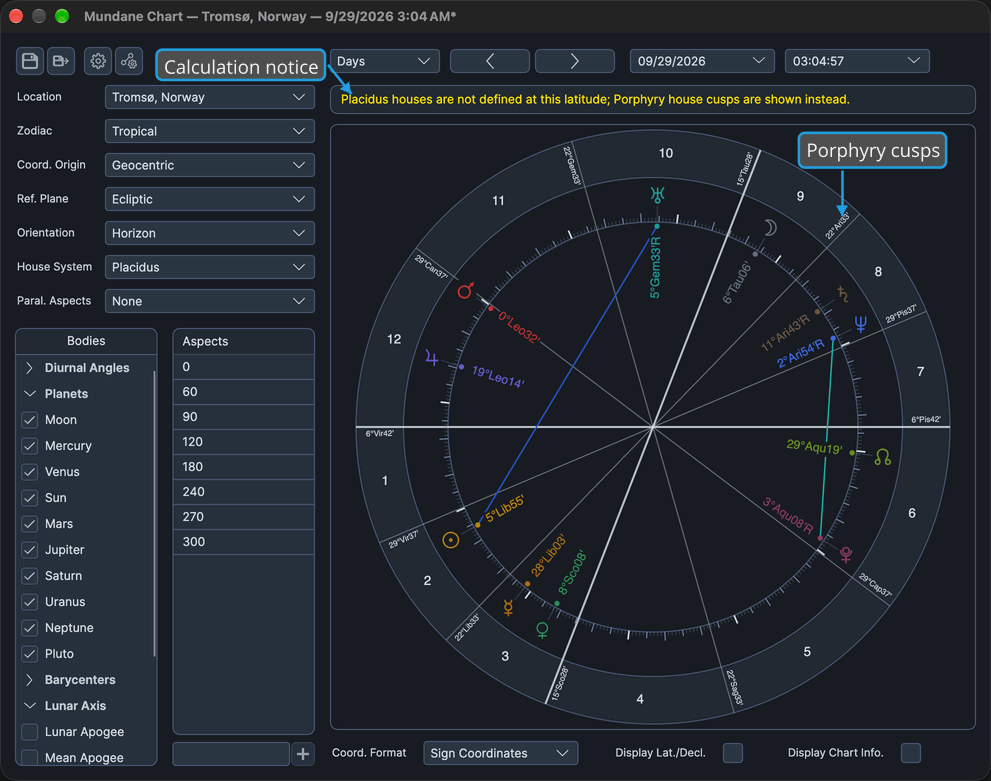
Know when the chart on screen is not exactly what you asked for, and why. A banner appears above the wheel of every chart window only when there is something to report about the chart's calculation. Read it when it appears, and point at a shortened message to read it in full.
What the Banner Reports
The banner carries two kinds of message:
| Message | Color | When It Appears |
|---|---|---|
| Error | Red | The chart could not be calculated for the current inputs. |
| Notice | Amber in the light theme, yellow in the dark theme | The calculation has something to report: for example, that the chosen house system is not defined at the location's latitude and Porphyry cusps are shown instead, that a dragged body has no transit of the chosen degree within the ephemeris range, or that a dragged pair never forms the aspect within the ephemeris range. |
An error and a notice can show at once, the error above the notice. A long message is trimmed after two lines, and its full text appears in a tooltip when you point at it. The wheel shrinks to make room for the banner, so the banner never covers it, and the banner disappears when there is nothing to report.
Show a Shortened Error Message in Full
To read the whole of a calculation error that the banner has cut short:
- Point at the shortened error message in the banner above the wheel.
A tooltip shows the full error text.
Show a Shortened Notice in Full
To read the whole of a calculation notice that the banner has cut short:
- Point at the shortened notice in the banner above the wheel.
A tooltip shows the full notice text.
Related Topics
- Chart Frame: the house system a notice may report as not defined at the location's latitude.
- Drag a Body to Its Transit: the drag whose search can end in a notice.
- Drag a Body to an Aspect: the drag whose aspect search can end in a notice.
- Chart Wheel: the wheel the banner sits above.