Drag a Body to Its Transit
Find when a planet will next, or last, reach a particular point (a sign or house cusp, an angle, another planet, or an aspect to a natal point) by pointing at it. On the Mundane Chart and the Transit Chart, hold Shift, press on a transiting body's glyph and drag it around the wheel, counterclockwise for the next occurrence or clockwise for the previous one, then release it on the target. The chart jumps to the exact moment the body reaches the released degree. Press Esc to cancel.
How the Drag Works
While you drag, a translucent ghost of the body rides the wheel with a live label, and the chart itself stays still. The label shows an arrow and the degree the release will use: → for the next transit, ← for the previous one. It shows the degree alone, with no arrow, when a release there would do nothing.
Within 1.5° of a target, the ghost snaps to it. The targets are:
- A sign cusp.
- A house cusp.
- An angle.
- Another body.
- Each natal point's aspect points for the chart's aspect angles, on the Transit chart only. A transit to one of them is that aspect's perfection, and while you drag, the ghost draws the matching transit-to-natal chords.
Away from every target, the raw degree under the ghost is used.
The way you wind the drag decides which transit the chart jumps to:
- A counterclockwise wind finds the next transit of the degree, and a clockwise wind the previous one.
- The net rotation decides the direction, not where the release lands, so a long clockwise wind that ends a little ahead of the body still means the previous transit.
- Each whole lap wound before the release finds one occurrence further on, or further back.
- A release back on the body's own place does nothing, unless the drag wound a whole lap. The chart then jumps to the body's next or previous return.
When the chart jumps, the date and time pickers, the window title and the chart information block move to the new moment. If the body has no such transit within the ephemeris range, a notice appears in the Chart Message Banner and the chart stays where it was.
Only Shift starts this drag, and it must be held when you press the mouse button. Pressing with Shift and Control (Ctrl on Windows) together starts no drag. Natal bodies and the angles cannot be dragged.
Jump to a Body's Next Transit of a Degree
To find when a transiting body will next reach a chosen point:
- Hold down Shift and press the left mouse button on a transiting body's glyph.
- Drag the glyph counterclockwise around the wheel until its ghost reaches the target.
- Release the mouse button.
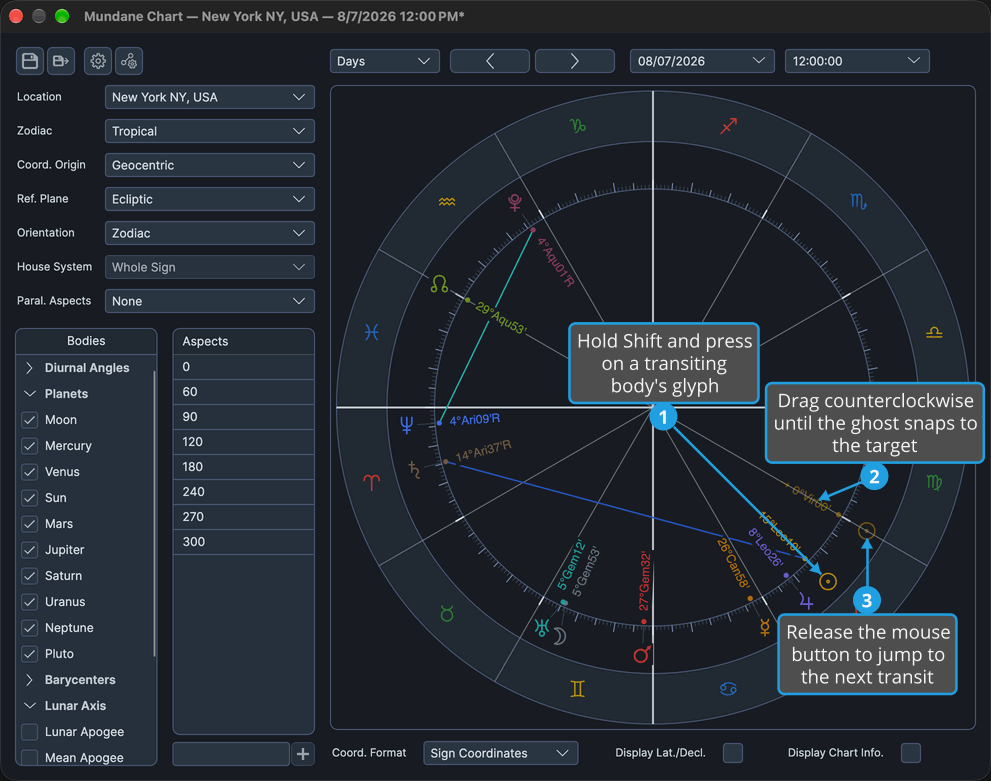
The chart jumps to the exact moment the body next reaches the released degree: the snapped target within 1.5°, otherwise the raw degree. Each whole counterclockwise lap wound before the release finds one occurrence further on, and a release back on the body's own place after a whole lap jumps to its next return.
Jump to a Body's Previous Transit of a Degree
To find when a transiting body last reached a chosen point:
- Hold down Shift and press the left mouse button on a transiting body's glyph.
- Drag the glyph clockwise around the wheel until its ghost reaches the target.
- Release the mouse button.
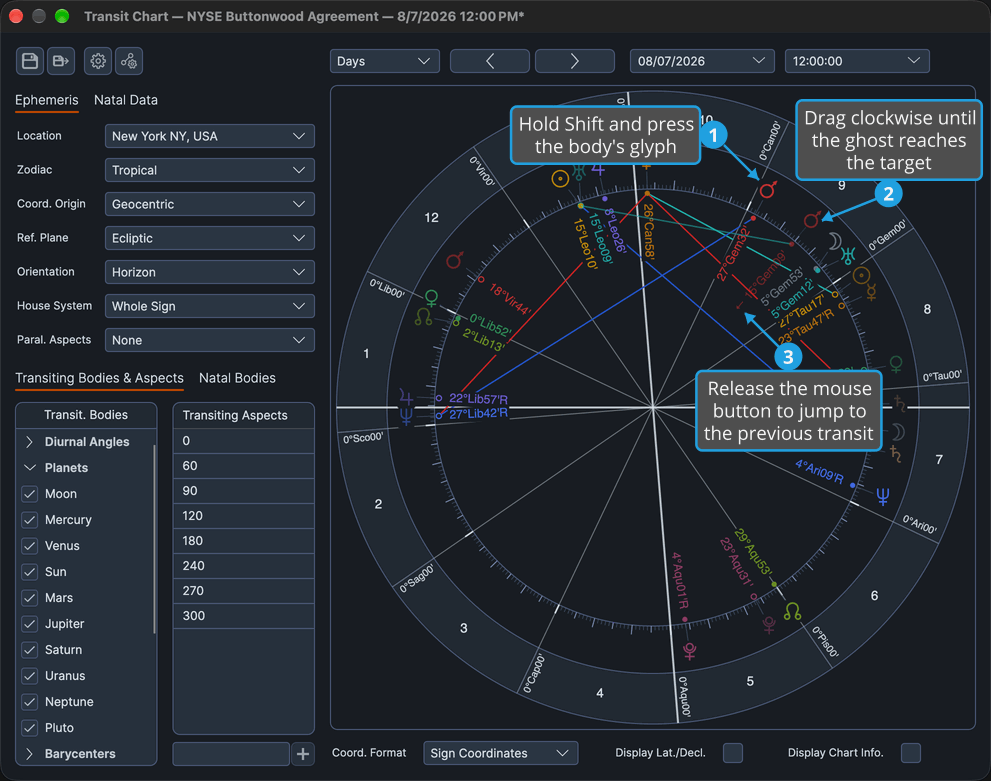
The chart jumps to the exact moment the body last reached the released degree: the snapped target within 1.5°, otherwise the raw degree. Each whole clockwise lap wound before the release finds one occurrence further back, and a release back on the body's own place after a whole lap jumps to its previous return.
Cancel a Shift-Drag
To abandon a Shift-drag without moving the chart:
- Hold down Shift and press the left mouse button on a transiting body's glyph.
- Drag the glyph away from its place.
- Press Esc with the mouse button still held.
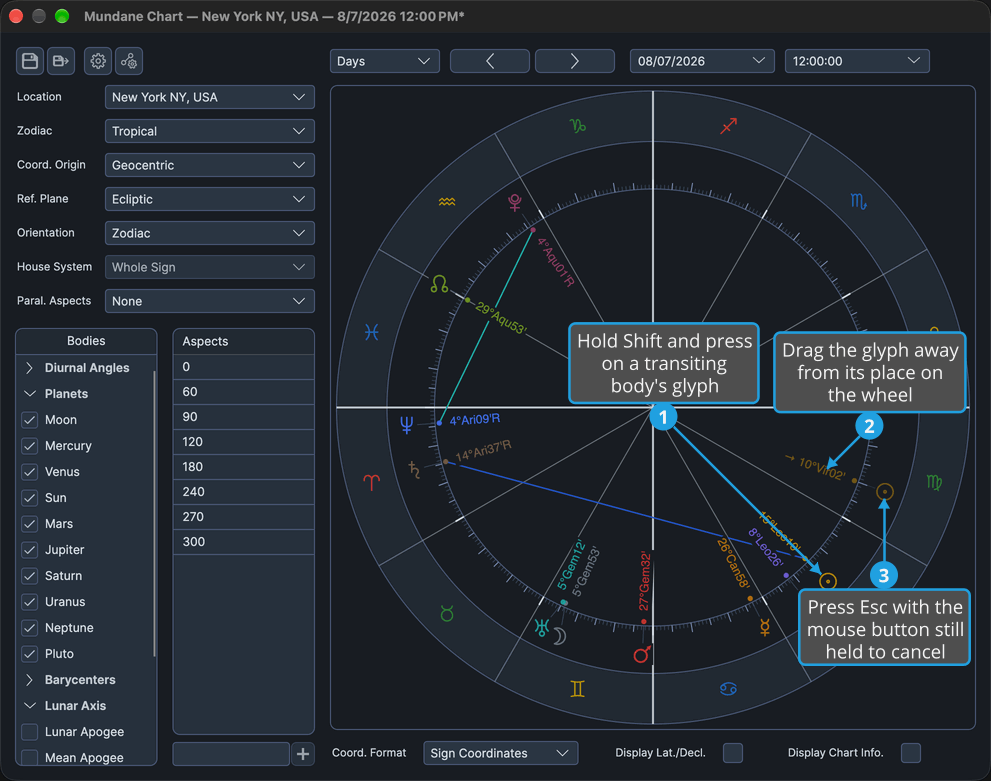
The ghost disappears and the chart stays at the moment it showed before the drag. Releasing the mouse button afterward does nothing.
The drag is also canceled if the window loses the pointer, or if something changes that the drag cannot follow, such as resizing the window or changing the chart or its display options.
Related Topics
- Drag a Body to an Aspect: drag a transiting body with the whole chart following it, and land on an aspect.
- Chart Aspect Angles: the aspect angles that give the Transit chart's aspect points.
- Chart Time Navigation: step the chart through time or type a date and time.
- Chart Message Banner: where a notice appears when a drag finds no transit.
- List a Direction by Dragging: the Shift-drag of the Primary Directions, Solar Arc Directions and Secondary Progressions charts, which lists a direction.