Chart Window Toolbar
Save the chart and reach the settings that govern it without leaving the chart window. The toolbar is the row of four icon buttons at the top left of every chart window, above its settings panel: Save and Save As write the chart to a file, Chart Settings opens the Chart Settings editor, and Aspect Settings opens the Aspect Settings editor for this chart's own type. The same row appears on all six chart types: Mundane, Natal, Transit, Primary Directions, Solar Arc Directions and Secondary Progressions.
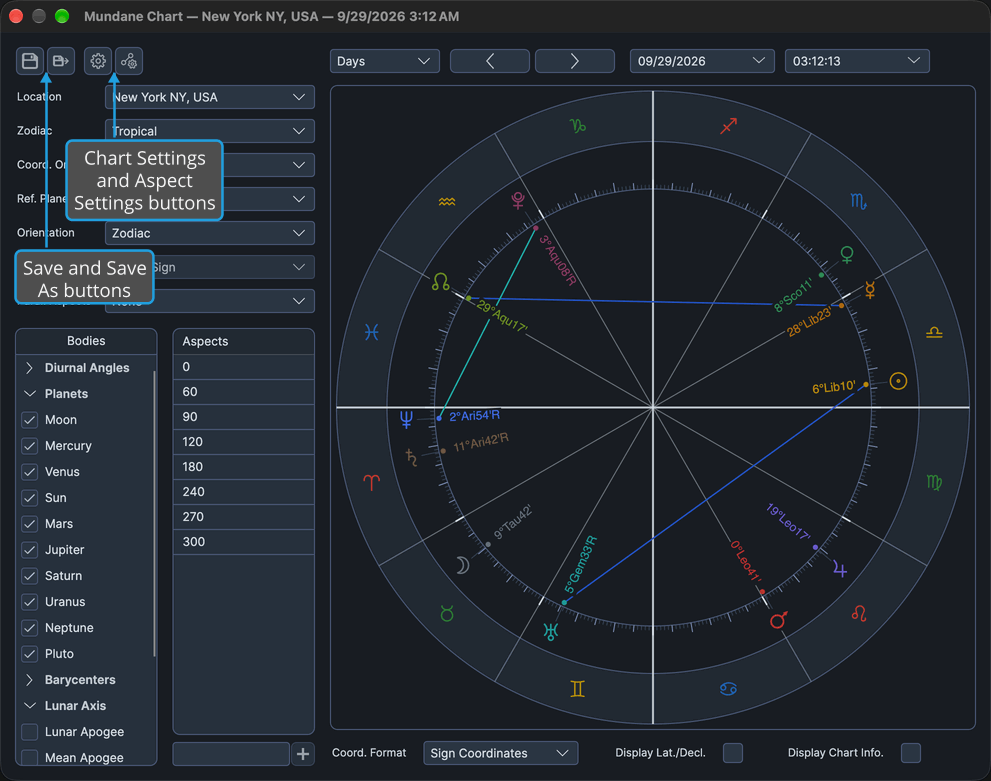
Chart File Commands
The two chart file buttons write the chart to a .compass file:
| Command | Description | Details |
|---|---|---|
| Save | Writes the chart to the file the window is bound to, or asks for a file when the window has none. Grayed while the window is bound and unchanged. | Cmd+S (Ctrl+S on Windows). See Save Chart. |
| Save As | Writes the chart to a file chosen in the Save Chart dialog and re-binds the window to it. Always enabled. | Cmd+Shift+S (Ctrl+Shift+S on Windows). See Save Chart. |
Settings Commands
The two settings buttons open the same editors as the main window's Edit menu, and each brings forward an editor that is already open rather than opening a second one.
| Command | Description | Details |
|---|---|---|
| Chart Settings | Opens the Chart Settings editor, where you edit chart defaults and colors. | See Chart Settings Window. |
| Aspect Settings | Opens the Aspect Settings editor for this chart's own type, where you edit that type's aspect orbs and colors. | Procedure below. See also Aspect Settings Window. |
The main window's toolbar has an Aspect Settings drop-down button whose menu lists the six chart types. The chart window's Aspect Settings button offers no choice: it opens the editor for its own chart type.
Open This Chart Type's Aspect Settings
To edit the aspect orbs and colors of the chart type in front of you:
- Click the Aspect Settings button on the chart window's toolbar.
The Aspect Settings editor for this chart's own type opens, or is brought forward when it is already open. Clicking Edit → Aspect Settings on the main window's menu bar, then the chart type in the Aspect Settings submenu, opens the same editor.
Related Topics
- Save Chart: what Save and Save As do, and the Unsaved Changes prompt when a changed chart closes.
- Chart Settings Window: the editor the Chart Settings button opens.
- Aspect Settings Window: the per-type editor the Aspect Settings button opens.
- Main Toolbar and Menu Bar: the main window's routes to the same editors.