Transit Chart
A Transit chart shows how the planets at a given moment relate to a person's natal chart. It draws the transiting positions for a location and moment together with the natal positions from a natal record, and it is the chart for timing current influences on a person. Click Charts → Transit Chart to open one (see New Chart), select the natal record on the Natal Data tab, then type or step the transiting date and time above the wheel.
What Defines a Transit Chart
A Transit chart has a transiting side and a natal side:
- The transiting side is a location and a moment. The Ephemeris tab of the settings panel sets the location and the transiting frame, and the time band above the wheel carries the transiting date and time and steps the transiting moment. The Transit. Bodies list on the Transiting Bodies & Aspects tab chooses the transiting bodies.
- The natal side is a natal record, chosen on the Natal Data tab with its Natal Date and Natal Time. The list on the Natal Bodies tab chooses the natal bodies.
Aspects are matched only between a transiting point and a natal point. The houses and angles are those of the transiting moment and location. A new Transit chart opens at the default location at the present moment, against a built-in default natal record.
How It Differs from the Mundane and Natal Charts
A Transit chart combines a Mundane Chart's moment with a Natal Chart's record. Where each of those draws one set of points, the Transit chart carries both sets on one wheel and matches aspects across them.
Window Layout
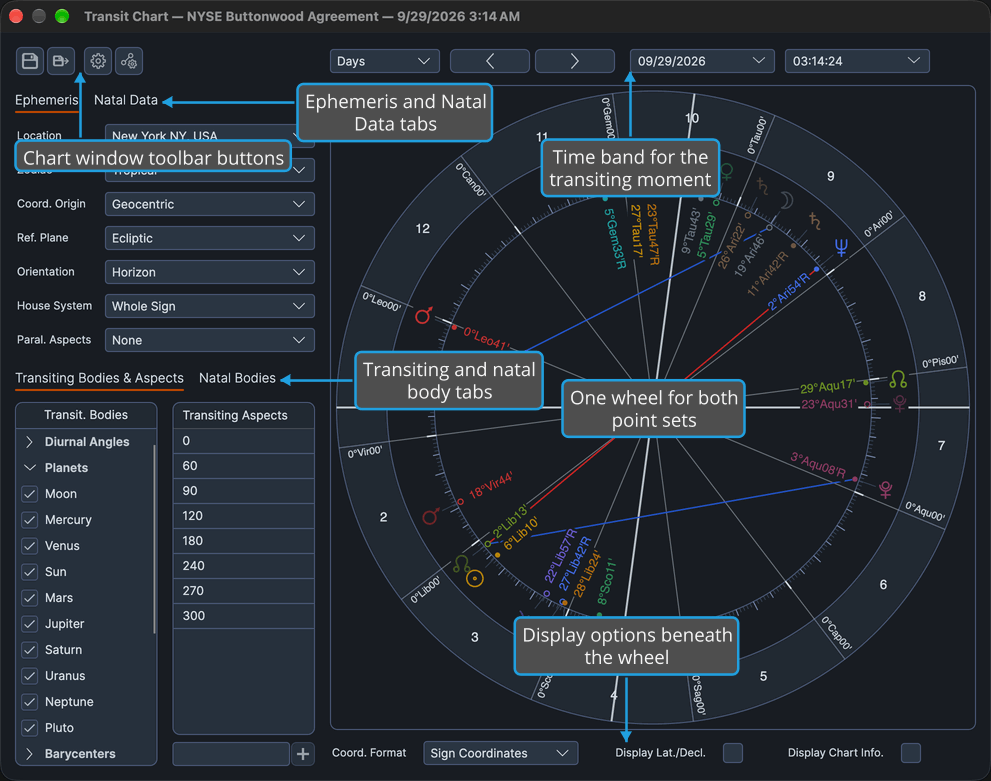
The Transit chart window holds these areas:
- Chart Window Toolbar: four icon buttons at the top left of the window, above the settings panel, for saving the chart and opening the Chart Settings and Aspect Settings editors.
- Transit Chart Configuration: the settings panel, in two pairs of tabs: Ephemeris and Natal Data in the upper pair, and Transiting Bodies & Aspects and Natal Bodies in the lower pair. The Ephemeris tab holds the Location row, the frame rows and the Paral. Aspects drop-down, and the Natal Data tab holds the natal record with its Natal Date and Natal Time. The Transiting Bodies & Aspects tab holds the Transit. Bodies list beside the Transiting Aspects grid, and the Natal Bodies tab holds the list of natal points plotted. The frame rows are described in Chart Frame, the lists in Chart Bodies Selection and the grid in Chart Aspect Angles.
- Chart Time Navigation: the time band above the wheel, with the date and time pickers for the transiting moment, a step-unit drop-down and back and forward chevrons.
- Chart Message Banner: a banner above the wheel that appears only when there is an error or a notice to report about the chart's calculation.
- Chart Wheel: the wheel in the middle of the window, carrying the transiting and natal points on one ring, with a splitter between it and the settings panel that moves width between them. Right-clicking a body glyph or an aspect chord opens the Wheel Context Menu.
- Chart Display Options: the display strip beneath the wheel, with Coord. Format, Display Lat./Decl. and Display Chart Info.
On the wheel, Shift-drag a transiting body to jump the chart to the moment it reaches a degree, or Control-drag (Ctrl-drag on Windows) a transiting body to move the whole chart with it and land on an aspect; see Drag a Body to Its Transit and Drag a Body to an Aspect.
Related Topics
- New Chart: open a Transit chart.
- Natal Records Editor and Locations Editor: the natal records and places a Transit chart draws on.
- General Chart Defaults: the default location and frame a new Transit chart opens with.
- Save Chart and Open Chart File: keep a Transit chart and come back to it.
- Open a Chart from Aquila: Transit charts opened from Aquila.