Toggle Column Visibility
Show only the metrics that matter for reading a study's events. Right-click any column header of the events table to open the column menu, which lists every column of the table with a check box, and click a column's check box to show or hide it. The menu stays open while you work, so you can change several columns in one visit, and the visible columns are saved with the study's table layout when the menu closes.
Show or Hide Events Table Columns
Choose which of the study's metrics the events table shows. Select the study in the Studies list first (see Open an Event Generator Study).
- Right-click any column header of the events table to open the column menu.
- Click the check box beside a column's name to show or hide that column.
- Press Esc to close the column menu.
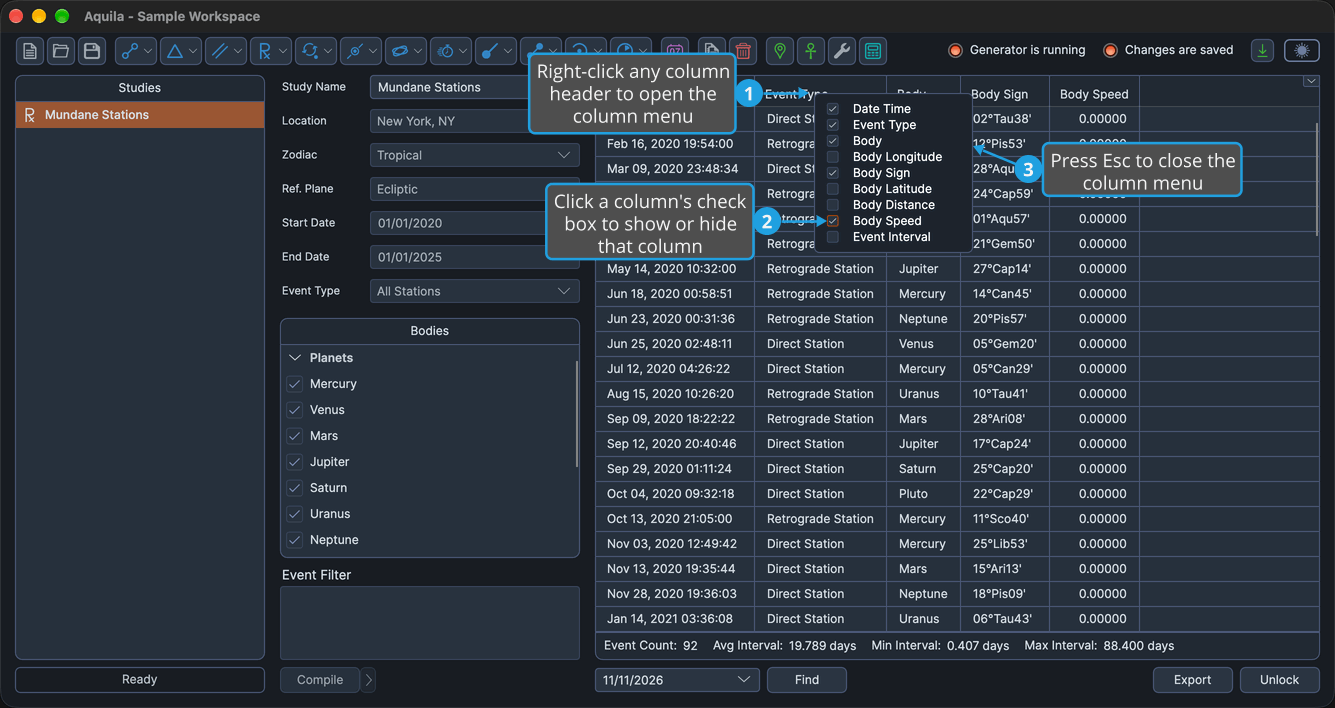
A column is shown as soon as you check its box and hidden as soon as you uncheck it. The menu stays open while you click check boxes, so you can change several columns before you close it. Clicking outside the menu also closes it. When the menu closes after you have changed a column, the visible columns are saved with the study's table layout.
To start every new study of the same type with the columns you chose, see Save Default Events Table Layout.
Columns Unavailable Under the Equatorial Plane
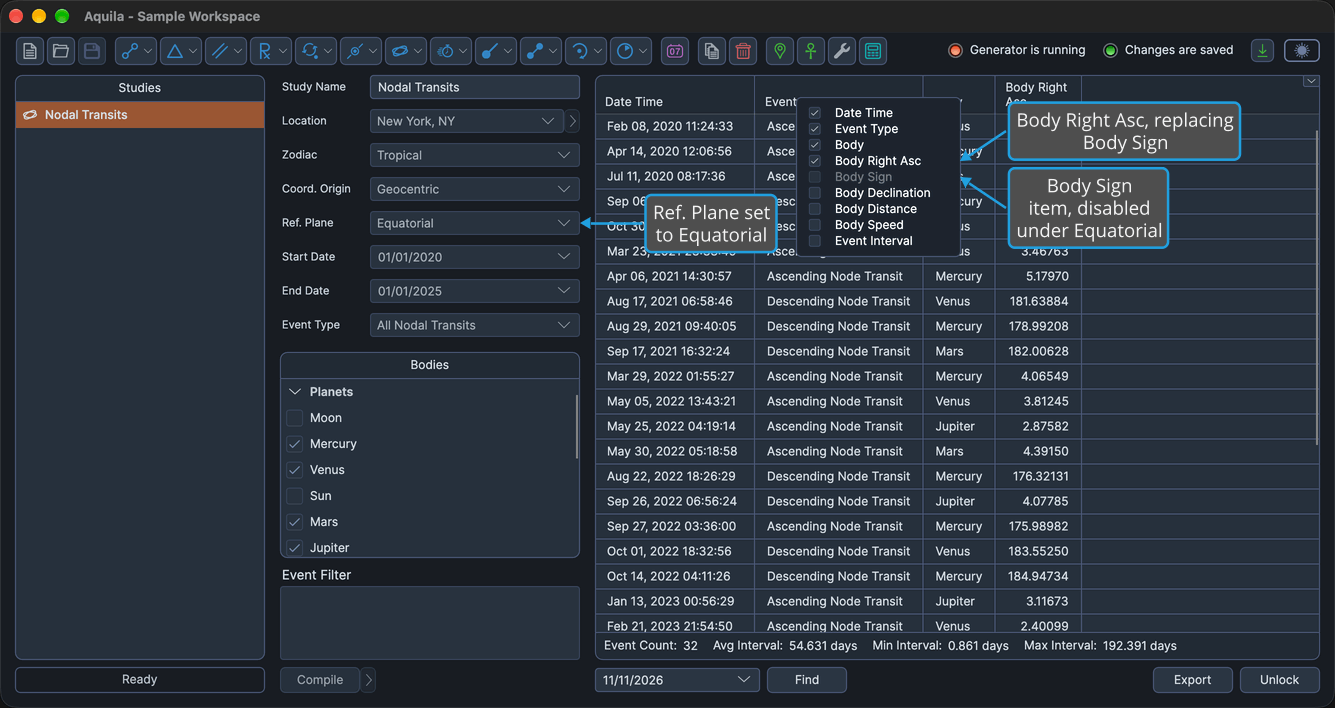
When the study uses the Equatorial plane (Ref. Plane in the study's Ephemeris Settings), the sign position columns are listed in the menu but disabled: the study cannot show sign positions under that plane. A sign position column that was showing is replaced by the matching longitude column under its Equatorial plane header: Body Sign, for example, gives way to Body Right Asc. Switching back to the Ecliptic plane restores the columns as you left them.
Column Menu Items
The menu lists every column the study can show, each with a check box: the Date Time column, the Event Type column on the study types that have one, and one item for each metric of the study type. The items appear in the order Aquila creates the columns. Dragging a column header changes only where the column appears in the table, so after you reorder columns the menu still lists them in their original order.
The items depend on the study type. The two examples below show a study type with an Event Type column and one without, under each reference plane. The Events Table page lists the columns of every study type.
Nodal Transits Study
The column menu of the Nodal Transits Study includes the Event Type column.
| Ecliptic Plane | Equatorial Plane |
|---|---|
| Date Time | Date Time |
| Event Type | Event Type |
| Body | Body |
| Body Longitude | Body Right Asc |
| Body Sign | Body Sign |
| Body Latitude | Body Declination |
| Body Distance | Body Distance |
| Body Speed | Body Speed |
| Event Interval | Event Interval |
Under the Equatorial plane, Body Sign is listed but disabled.
Conjunction Activations Study
The column menu of the Conjunction Activations Study has no Event Type item.
| Ecliptic Plane | Equatorial Plane |
|---|---|
| Date Time | Date Time |
| Inner Body | Inner Body |
| Inner Body Longitude | Inner Body Right Asc |
| Inner Body Sign | Inner Body Sign |
| Inner Body Latitude | Inner Body Declination |
| Inner Body Distance | Inner Body Distance |
| Inner Body Speed | Inner Body Speed |
| Outer Body | Outer Body |
| Outer Body Longitude | Outer Body Right Asc |
| Outer Body Sign | Outer Body Sign |
| Outer Body Latitude | Outer Body Declination |
| Outer Body Distance | Outer Body Distance |
| Outer Body Speed | Outer Body Speed |
| Cycle Angle | Cycle Angle |
| Phase | Phase |
| Separation | Separation |
| Natal Body | Natal Body |
| Natal Body Longitude | Natal Body Right Asc |
| Natal Body Sign | Natal Body Sign |
| Natal Body Latitude | Natal Body Declination |
| Natal Body Distance | Natal Body Distance |
| Natal Body Speed | Natal Body Speed |
| Event Interval | Event Interval |
Under the Equatorial plane, Inner Body Sign, Outer Body Sign and Natal Body Sign are listed but disabled.
Menu Item Structure for Other Study Types
Every other study type builds its column menu to the same pattern. The actual items depend on the study type's metrics; the Events Table page lists them for each study type.
| Position | Item |
|---|---|
| First, always | Date Time |
| Second, on the 14 study types that have this column | Event Type |
| Next, one item per metric, in the study type's order | {Metric}: the metric's name under the study's plane, with Longitude and Latitude under the Ecliptic plane becoming Right Asc and Declination under the Equatorial plane |
Every item has a check box that shows or hides its column. The item of a sign position column is disabled while the study uses the Equatorial plane.