Toolbar
The toolbar is the strip of icon buttons directly below the menu bar. Each button runs one of the most common commands in a single click. To use the toolbar, click a button; each command's full behavior is documented on its own page.
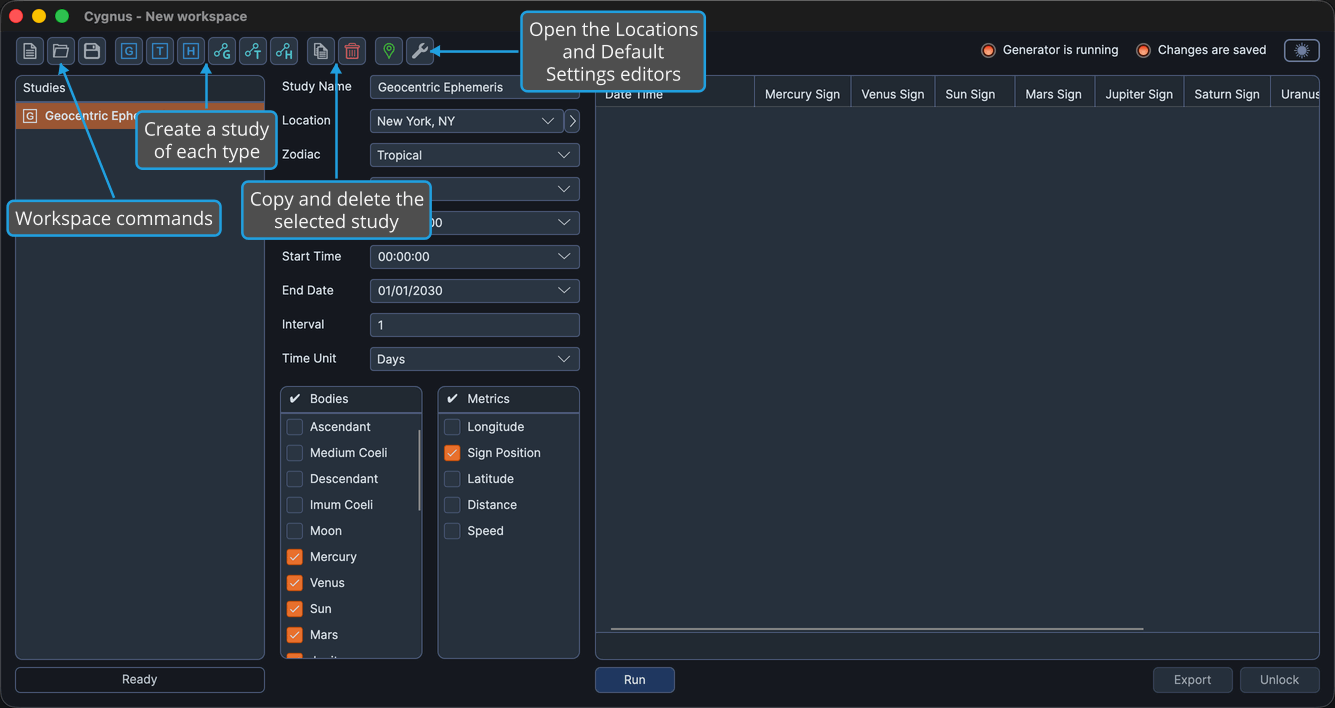
Workspace Buttons
| Button | Action | Details |
|---|---|---|
| New | Start a new, empty workspace | New Workspace |
| Open | Open an existing .cygnus workspace | Open Workspace |
| Save | Save the current workspace | Save Workspace |
Study Buttons
| Button | Action | Details |
|---|---|---|
| Geocentric Ephemeris | Add a geocentric ephemeris study | Geocentric Ephemeris Study |
| Topocentric Ephemeris | Add a topocentric ephemeris study | Topocentric Ephemeris Study |
| Heliocentric Ephemeris | Add a heliocentric ephemeris study | Heliocentric Ephemeris Study |
| Geocentric Aspect Ephemeris | Add a geocentric aspect ephemeris study | Geocentric Aspect Ephemeris Study |
| Topocentric Aspect Ephemeris | Add a topocentric aspect ephemeris study | Topocentric Aspect Ephemeris Study |
| Heliocentric Aspect Ephemeris | Add a heliocentric aspect ephemeris study | Heliocentric Aspect Ephemeris Study |
The six study buttons are also available on the Ephemerides menu. See Create Study.
Study Management Buttons
| Button | Action | Details |
|---|---|---|
| Copy | Duplicate the selected study | Copy Study |
| Delete | Remove the selected study | Delete Study |
Editor Buttons
| Button | Action | Details |
|---|---|---|
| Locations | Open the Locations Editor | Locations Editor |
| Default Settings | Open the Default Settings Editor | Default Settings Editor |