Lunar Eclipse Activations Study
A Lunar Eclipse Activations study tells you which lunar eclipses strike the natal bodies of a natal record. Create the study from the Transit Studies menu, choose the natal record, set the Transit Orb, check the eclipse types and the natal bodies, list the aspects, and generate the events.
Overview
A Lunar Eclipse Activations study finds the lunar eclipses that form an aspect to a natal body from the Natal Bodies list. It keeps only the eclipse types checked on the Eclipse Types tab: Total, Partial and Penumbral.
The aspects the study looks for are the angles in the Transiting Aspects table, each measured from the eclipse to the natal body. An angle does not have to be exact: the aspect counts while it is within the Transit Orb, a separate setting on the Natal Data tab. Orb Settings describes the orb, and Aspects Table describes how to list the angles.
Each event is one row of the events table: the date and time of the eclipse, its type, Saros series and member number, the position of the eclipse point, the aspect it forms, and the natal body with its position.
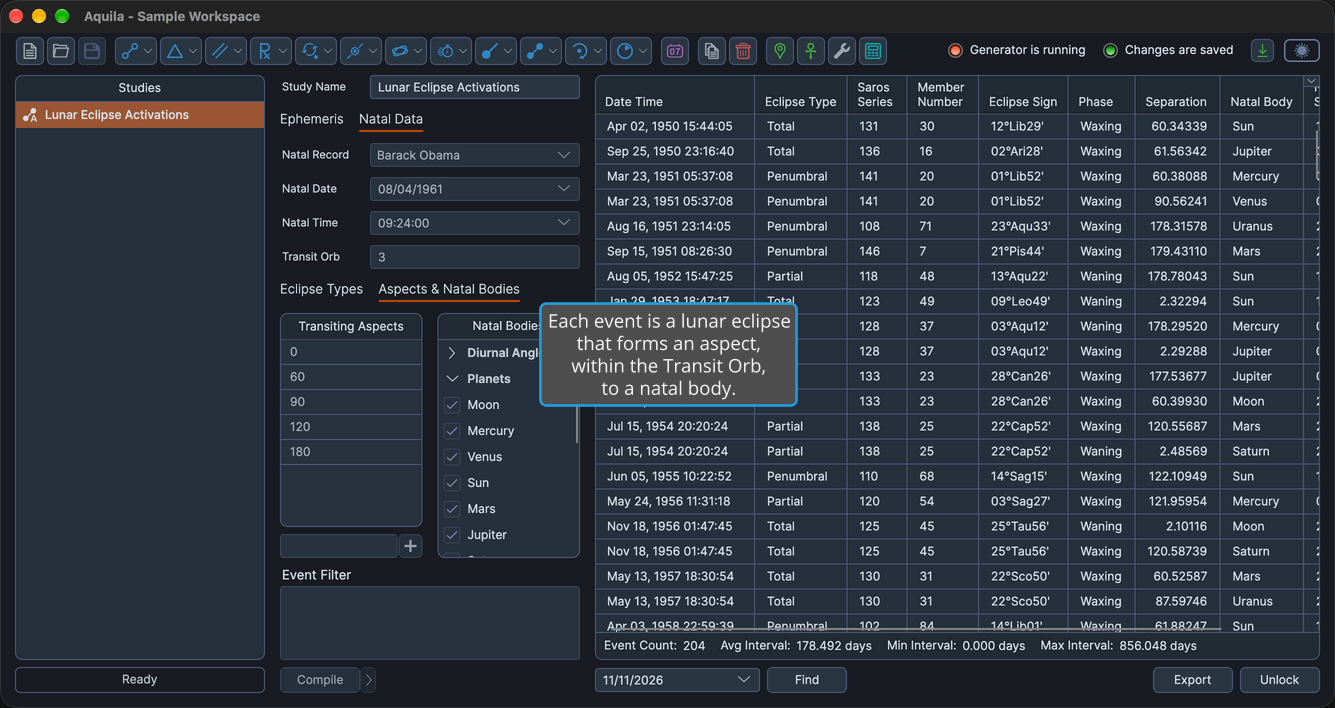
The study's settings are on two sets of tabs, one above the other:
| Tab | What It Holds |
|---|---|
| Ephemeris | The ephemeris settings and the date range. |
| Natal Data | The Natal Record drop-down, the Natal Date and Natal Time boxes filled in from the record, and the Transit Orb box. |
| Eclipse Types | The checklist of lunar eclipse types. |
| Aspects & Natal Bodies | The Transiting Aspects table beside the Natal Bodies list. |
Choose the natal record as described in Natal Data, check the eclipse types as described in Eclipse Types Selection, and check the natal bodies as described in Bodies List. Set up the rest of the study as described in Study Configuration. Generate Events describes how to fill the events table, and Working with Events describes what you can do with the events.
To list lunar eclipses without reference to a natal record, use the Lunar Eclipses Study. To find the lunar eclipses that fall on hotspot degrees, use the Lunar Eclipse Hotspots Study.
Create a Lunar Eclipse Activations Study
You can create a study whenever a workspace is open and Aquila is not saving or loading it. On macOS, the menu bar is at the top of the screen; on Windows, it is inside the Aquila window.
- Click Transit Studies on the menu bar.
- Click Lunar Eclipse Activations in the Transit Studies menu.
Aquila adds the new study, named after its type, at the end of the Studies list and selects it. The study takes its settings from the workspace defaults and the default presets, and the workspace now has unsaved changes. Create Study describes where a new study's settings come from.
The toolbar offers the same study: click the Lunar Eclipse Studies drop-down button, which shows the Lunar Eclipses icon, and choose Lunar Eclipse Activations. On Windows, you can also create the study from the keyboard by pressing Alt+T and then L.
Events Table Columns
The events table of a Lunar Eclipse Activations study has 17 columns. Lunar Eclipse Activations and Solar Eclipse Activations studies share this set of columns. The last column below says whether a column is shown by default. To show or hide a column, right-click any column header, as described in Toggle Column Visibility.
| Column | Description | Shown by Default |
|---|---|---|
| Date Time | The date and time of the eclipse, in the time zone of the study's location. It always stays the first column. | Yes |
| Eclipse Type | The type of the eclipse: one of the types checked on the Eclipse Types tab. | Yes |
| Saros Series | The number of the Saros series the eclipse belongs to. | Yes |
| Member Number | The eclipse's member number within its Saros series. | Yes |
| Eclipse Longitude | The longitude of the eclipse point, in degrees (0 to 360). Under the Equatorial reference plane, it shows right ascension and is headed Eclipse Right Asc. | No |
| Eclipse Sign | The zodiac sign position of the eclipse point (degree, sign and minute). | Yes |
| Eclipse Latitude | The latitude of the eclipse point, in degrees. Under the Equatorial reference plane, it shows declination and is headed Eclipse Declination. | No |
| Cycle Angle | The cycle angle of the aspect, in degrees (0 to 360). | No |
| Phase | The phase of the aspect, worked out from the cycle angle: New, Waxing, Full or Waning. | Yes |
| Separation | The angular separation of the aspect, in degrees (0 to 180): the shorter way around the cycle angle. | Yes |
| Natal Body | The natal body that the eclipse aspects. | Yes |
| Natal Body Longitude | The natal body's longitude, in degrees (0 to 360). Under the Equatorial reference plane, it shows right ascension and is headed Natal Body Right Asc. | No |
| Natal Body Sign | The natal body's zodiac sign position (degree, sign and minute), with a D or R motion marker where the body's motion is shown. | Yes |
| Natal Body Latitude | The natal body's latitude, in degrees. Under the Equatorial reference plane, it shows declination and is headed Natal Body Declination. | No |
| Natal Body Distance | The natal body's distance, in AU. | No |
| Natal Body Speed | The natal body's speed in longitude (right ascension under the Equatorial reference plane), in degrees per day. | No |
| Event Interval | The number of days since the previous event in the table, to three decimal places. It is empty on the first event. | No |
The reference plane is part of the study's Reference System, which you set in Ephemeris Settings. Under the Equatorial reference plane, the Eclipse Sign and Natal Body Sign columns are unavailable: they are empty, they stay hidden, and you cannot check them in the column menu. A sign position column that was showing is replaced by the matching Right Asc column. Switching back to the Ecliptic reference plane restores the columns as you left them.