Primary Directions Chart
A Primary Directions chart times events in a life by the diurnal rotation of the sky, and helps you rectify a birth time by watching the directions re-date. Click Charts → Primary Directions Chart to open one (see New Chart), select the natal record, then drag promissors onto significators or click Calculate; use the chevrons above the wheel to nudge the birth time.
What the Chart Shows
A Primary Directions chart is a natal wheel, cast from a natal record at the birth moment, with the reference plane fixed at Ecliptic. It plots two body lists together:
- The promissors: the points carried.
- The significators: the targets.
Shift-drag a promissor onto a significator's place or one of its aspect points to list that direction, or click Calculate to list them all. Each listed direction is solved for its arc of direction and dated by the key you choose.
The wheel draws no aspect chords of its own and no parallels. The window adds a directions list at its right, so it opens wider than the Mundane, Natal and Transit charts.
This is the only technique chart with two senses, direct and converse. With Display Chart Info. checked, the chart information block on the wheel names the method, the direction frame and the key the chart is solved with.
Rectify a Birth Time
On this chart the chevrons above the wheel step the birth moment, so nudging the birth time re-dates every row in the directions list. Four minutes of birth time move a primary direction by about a year. You can also type a corrected birth date and time in the Natal Date and Natal Time fields on the Natal Data tab, as described in Primary Directions Chart Configuration.
Window Layout
The Primary Directions chart window holds these areas:
- Chart Window Toolbar: four icon buttons at the top left of the window, above the settings panel, for saving the chart and opening the Chart Settings and Aspect Settings editors.
- Primary Directions Chart Configuration: the settings panel, in two tab pairs. The upper pair is the Natal Data and Directions tabs, and the lower pair is the Promissors & Aspects and Significators tabs. The Natal Data tab holds the natal record, its birth date and time, and the frame rows (see Chart Frame). The Directions tab holds the technique's settings, described in Primary Direction Settings, Year Reckoning and Max Years. The Promissors & Aspects and Significators tabs hold the two body lists (see Chart Bodies Selection) and the Direction Aspects grid (see Chart Aspect Angles).
- Chart Time Navigation: the time band above the wheel, with a step-unit drop-down and back and forward chevrons. It carries no date and time pickers on this chart, and its chevrons step the birth moment.
- Chart Message Banner: a banner above the wheel that appears only when there is an error or a notice to report about the chart's calculation.
- Chart Wheel: the wheel in the middle of the window, with a splitter between it and the settings panel. Right-clicking a body glyph opens the Wheel Context Menu.
- Chart Display Options: the display strip beneath the wheel, with Coord. Format, Display Lat./Decl. and Display Chart Info.
- Directions List: the list of directions at the right of the window, with a splitter between it and the wheel. Above it sit a date field and a Find button (Find a Direction by Date); beneath it sit the Calculate button (Calculate Directions) and the Delete and Clear buttons (Remove Directions and Clear the Directions List). Its row menu also offers Copy Directions.
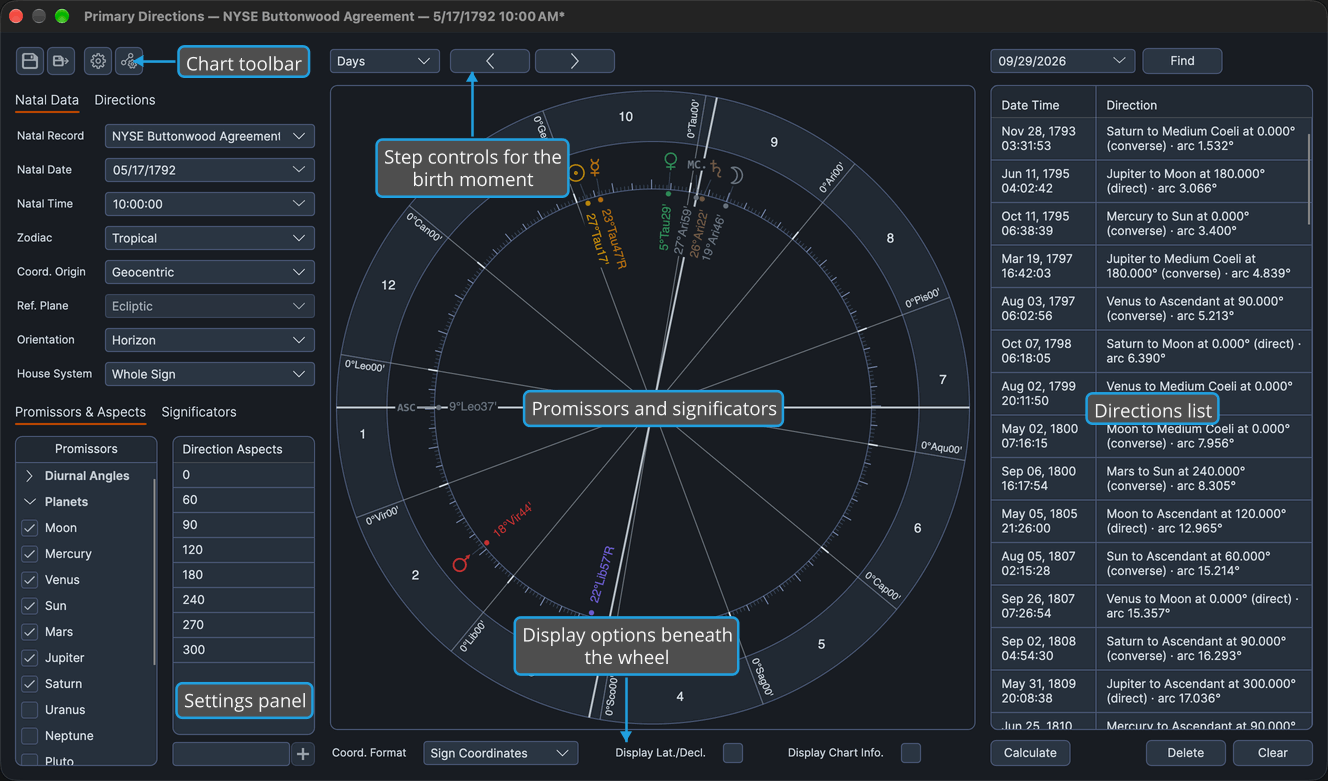
To list a direction from the wheel, Shift-drag a promissor onto a significator target, as described in List a Direction by Dragging. Dragging clockwise lists the direct direction, and counterclockwise the converse one.
Related Topics
- New Chart: open a Primary Directions chart.
- Primary Directions Defaults: the settings a new Primary Directions chart opens with.
- Save Chart and Open Chart File: keep a Primary Directions chart, with its listed directions, and come back to it.
- Solar Arc Directions Chart and Secondary Progressions Chart: the other two technique charts.